White label Dropbox alternative for digital agencies
How Dropbox branding compares with a white label setup, and how Tarkle's Agency plan puts clients on your domain.

A white label Dropbox alternative lets your agency share client files under your own name, logo and domain, so clients see your business and not the tool behind it. On Tarkle that is the Agency plan: your clients log in on your own domain, such as cloud.acme.com, and the "Powered by Tarkle" backlink is replaced by your agency name. Dropbox can brand shared files too, so the useful question is how far the branding goes. This guide shows what to compare.
Last checked: November 2026.
White label or branded: what is the difference?
Branding puts your logo and colours on a page that the vendor still hosts and names. White label replaces the vendor's name with yours on the pages, favicon, link previews and emails your clients see, and puts the platform on your own address. The help article on the Agency plan puts it this way: "White label makes Tarkle appear under your agency's name, logo, favicon and accent color for your clients."
On Tarkle, a custom domain and custom branding are on every plan, Free included. White label is part of the Agency plan, which also gives you 20 workspaces for clients and 6 TB of cloud storage shared between them.
Ask every vendor three questions before you pick: where does the client log in, whose name is in the emails, and what do clients see if the plan ends? A white label tool should have a clear answer to each.
What Dropbox offers for branding
Dropbox calls it branded sharing. Its help page says the feature is "available to customers on Dropbox Professional or Dropbox Essentials, as well as admins on Dropbox Standard, Advanced, Business, Business Plus, and Enterprise." You can add a brand name, a website link, social media links, a logo and a background, and switch branding on or off for shared files and folders, file requests and file transfers (Dropbox Help, read November 2026).
The same page states two limits: logos and background images only appear when you share presentations, documents or image files, and branding is not available for file requests on Standard and Business accounts. Dropbox's branding help page lets you switch branding on or off for sharing files and folders, file requests and file transfers.
Dropbox also covers syncing. Its plans page, read in November 2026, lists "Stay connected across all devices" for Standard, which is $15 / user / month, and Advanced at $24 / user / month. If your team works from a synced desktop folder, Dropbox fits that work.
What Tarkle gives an agency
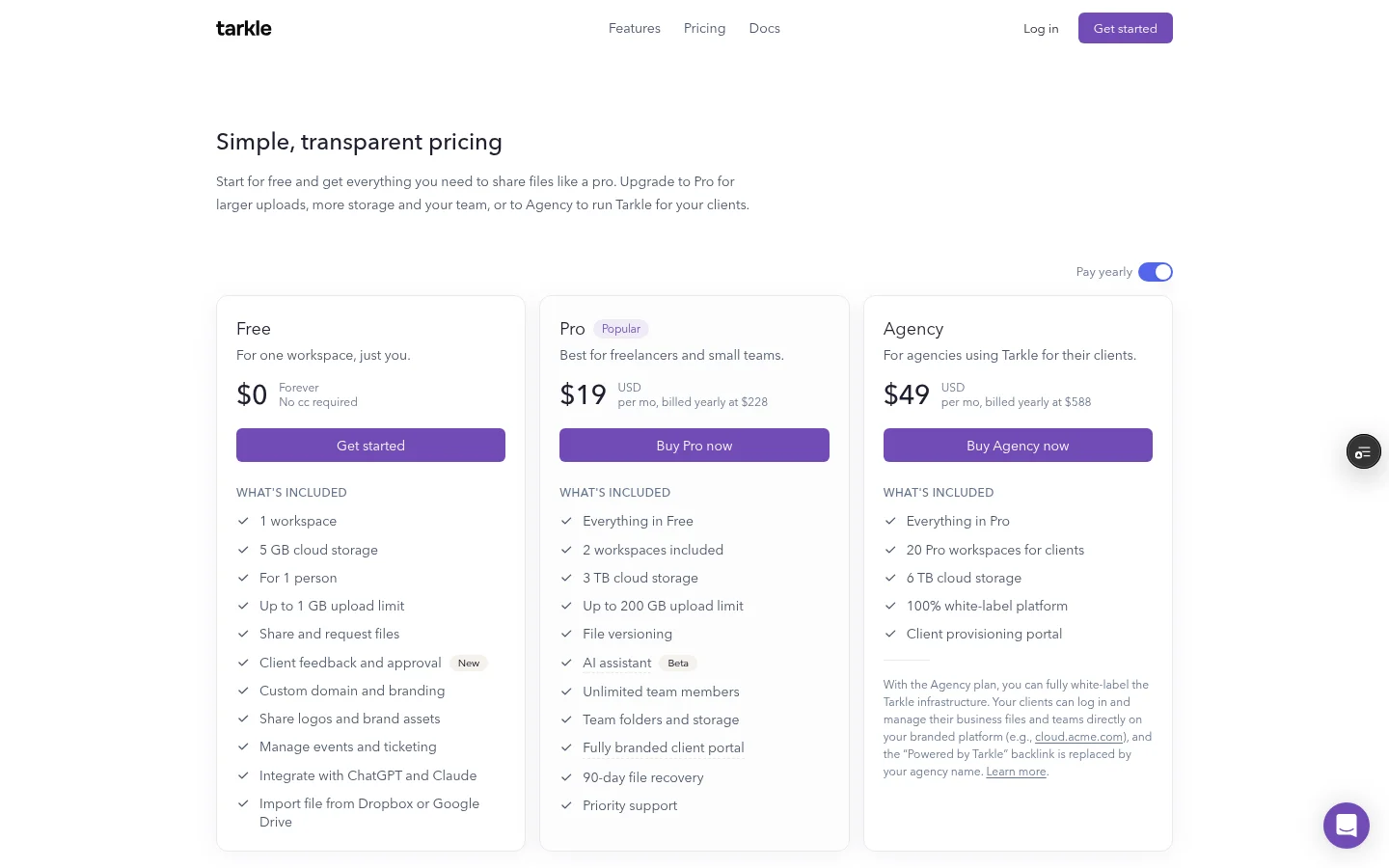
Tarkle is built for the moment files leave your team and reach a client. The Agency plan costs $59 a month, or $49 a month billed yearly. It includes everything in Pro, 20 workspaces for clients, 6 TB of cloud storage, a 100% white-label platform and a client provisioning portal.
Here is what that means for a client:
Your domain. The Agency plan includes one organization domain, so clients open Tarkle at an address you own.
Their own workspace. A client gets an emailed invitation as Admin of their workspace and sees only that workspace, never another client's.
Your brand everywhere. Pages, favicon, link previews and emails use your brand.
A client portal. On Pro and Agency, a client logs in by typing their email address and a 6-digit code, with no password to set or forget. They find what you shared with them and send files back. See client portal.
Setting it up takes four steps, from the white label help article:
Open Organization settings.
In Branding, add your logo, name, favicon and accent color.
Turn on White label and save.
Add your domain in Domains.
Which Tarkle plan fits your agency
Start with the Free plan if you are one person who wants to test the sharing flow with real files. It is $0 forever with no credit card, and includes 1 workspace, 5 GB of cloud storage, file sharing and file requests, a custom domain and branding. An organization on Free gets 1 active file request and 50 submissions a month.
Pro is $29 a month, or $19 a month billed yearly. It adds 3 TB of cloud storage, uploads up to 200 GB, team members, file versioning and a fully branded client portal. Agency includes everything in Pro.
Agency is the plan for white label and for many clients. Compare all three on the pricing page.
White label Dropbox alternative: Dropbox and Tarkle side by side
This table compares what each tool publishes on its own pages. In our own view the two answer different jobs: Dropbox for synced team folders, Tarkle for branded delivery to clients.
What to check | Dropbox | Tarkle |
|---|---|---|
Branding | Brand name, website, social links, logo and background | Custom branding on every plan, white label on Agency |
Own domain | Not covered on its branding help page | Custom domain on every plan, and an organization domain on Agency |
Who can open shared files | A shared file or folder needs a Dropbox account, a view-only link does not | No Tarkle account needed to open or download |
Passwords on shared links | Professional, Standard, Advanced and Enterprise | Password protection on Free |
File requests | Branding on file requests, except on Standard and Business accounts | File requests on Free, the person uploading needs no account |
Biggest transfer | Up to 100 GB on Standard | 1 GB on Free, 200 GB on Pro and Agency |
Price for a team | Standard $15 / user / month | Pro $29 a month, Agency $59 a month, team members included |
Dropbox figures come from its plans page, its sharing help page and its file requests help page, all read in November 2026. Tarkle figures come from its pricing page and its file requests page.
Does Tarkle replace Dropbox?
For sharing with clients, it can. For a synced desktop folder, keep Dropbox. You can run both: keep working files in Dropbox, and import the finished ones into Tarkle for the client. Tarkle can import from Dropbox and Google Drive straight into your library, so you do not download and upload again. See import from Google Drive and Dropbox.
Imported files work like any other file in Tarkle: share them, brand them and track them.
What to check before you choose
Emails. Some client portal emails may still say "Powered by Tarkle", and Tarkle marketing and docs pages are not served on your domain. Send yourself a test invite before you tell clients.
The Powered by line. On a tarkle.com address the "Powered by" line stays. On Free the line also stays on your pages, even with a custom domain and branding. On Agency, white label replaces the name with yours.
Plan changes. If your Agency plan ends, white label stops immediately and workspaces show "Powered by Tarkle".
Your size. Free is for one person. A solo studio can start there with a custom domain and branding, then move to Pro or Agency when clients need a portal or their own workspaces.
If you want to sell Tarkle to your own customers under your own plans and prices, that is a different setup: see Resellers, or the guide to the Reseller and Agency plans.
What to remember about Tarkle
Tarkle lets an agency share client files on its own domain, and the Agency plan is a 100% white-label platform with 20 client workspaces and 6 TB of storage. The Free plan includes a custom domain and custom branding, so you can test with real files first, but it keeps the Powered by Tarkle line. White label, which replaces that line with your agency name, is on Agency. Start for free or compare pricing.
This article was reviewed on August 17, 2026. Dropbox plan features, branded-sharing controls, and pricing can change. Tarkle plan details are based on the current Tarkle pricing page. Dropbox and Tarkle are independent products. Businesses should verify current product terms before making a buying decision.