
Tarkle vs vBoxxCloud: client sharing or a team sync cloud
A team cloud hosted in the Netherlands with sync and editing, against branded client sharing on your own domain.
Tarkle vs vBoxxCloud comes down to who receives the files. vBoxxCloud is built for a team that stores, syncs and edits files together. Tarkle is built for sending, collecting and delivering files to people outside the team. We make Tarkle, so read this as one vendor's view, and check the sources we link.
Last checked: October 2026.
What vBoxxCloud is
The vBoxxCloud pricing page says it is hosted in the Netherlands (October 2026). The vendor says files are encrypted with 256-bit AES and that its Dutch data centre holds ISO 27001:2013, ISO 9001:2015 and ISAE 3402 Type 1 certificates (encryption page, October 2026). These are the vendor's own statements.
vBoxxCloud also runs a second site at cloud.vboxx.eu, which presents a rebuilt product with different plans. This page covers vboxxcloud.com and notes where the second site differs.
What vBoxxCloud offers
The vboxxcloud.com pricing page, read in October 2026, lists a Basic plan per user at €8.80 per user per month billed yearly. Storage is added in blocks of 250 GB at €3.30 per block billed yearly. The Team plan is for 12 to 49 users.
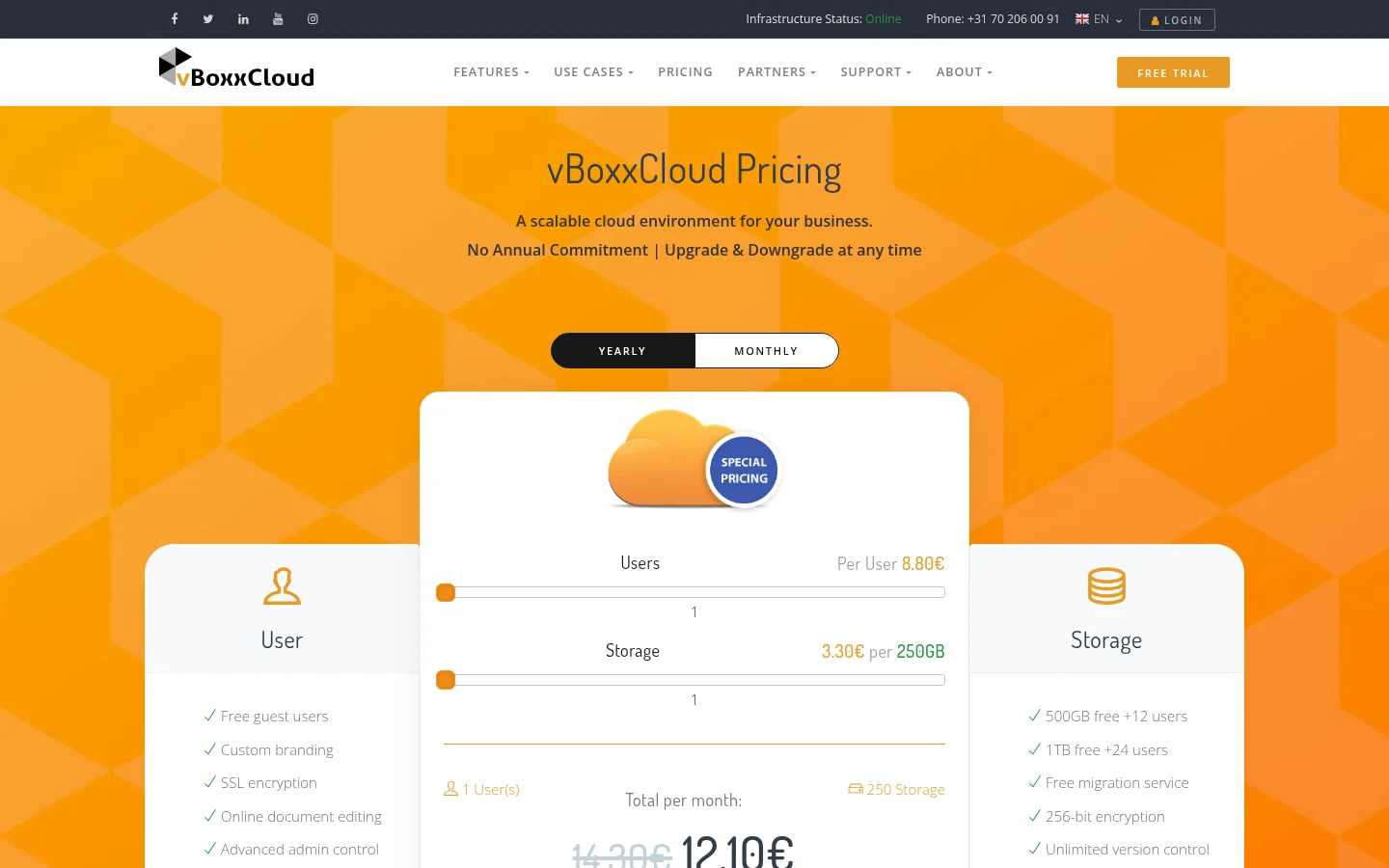
The pricing page lists a sync tool and mobile app. The pricing page also lists custom branding.
The file sharing page adds team shares with control over which devices can reach them. It lists Outlook integration. It lists Active Directory integration. It says you can edit Microsoft Office documents online with the online editor.
For people outside the team, the file sharing page describes a secure share that creates a free guest account for a recipient who is not registered. Notifications let you restrict a file with an expiration date or a maximum number of downloads. The page states "No file size limit" for files and folders.
The second site lists Starter for 5 to 15 users and Business from 20 users. Its plan table includes External guest access (File Requests).
What Tarkle does
A transfer can be protected with a password. You can set an expiration control. A view-only transfer lets people look at files without offering a download (view-only transfers).
On Pro and Agency you can charge for access to a transfer through your own Stripe account (paid transfers). Connect Stripe in Settings > Integrations. Turn on paid transfers in Settings. Free cannot charge for access.
File requests collect files from anyone with one link, into the folder you choose. You can set a deadline on a request. You can set a size limit on the total of the files in each upload (request deadlines and limits).
A client portal is a branded place where each client signs in with their email, sees only what you shared with them and sends files back. Pro includes a fully branded client portal. Custom domains are available on every plan (custom domain).
Transfer status shows whether a transfer was delivered, viewed or downloaded. The Slack integration sends alerts when files are viewed, downloaded or uploaded. File previews open more than 100 file formats without downloading them first.
You pick a storage region for your workspace, in Europe, the US, Asia-Pacific or Oceania (storage regions).
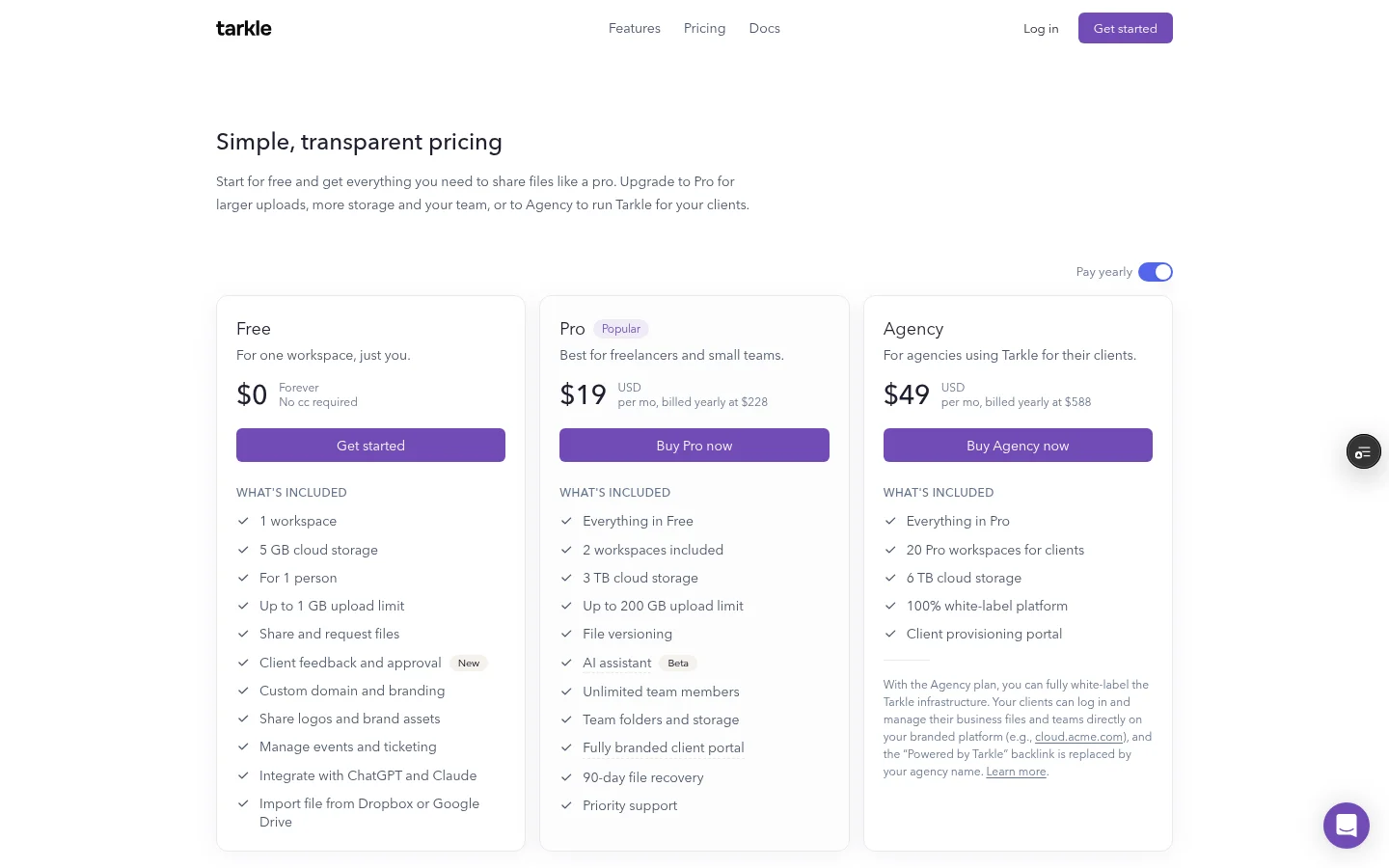
The plans are on Tarkle's pricing page. Free is $0. Free includes 5 GB of storage. Free uploads up to 1 GB. Free allows 15 transfers a month.
Pro is $29 per month, or $19 per month billed yearly. Pro includes 3 TB of storage. Pro uploads files up to 200 GB. Pro has unlimited team members.
Agency is $59 per month, or $49 per month billed yearly. Agency includes everything in Pro. It adds 20 workspaces for your clients. It also includes 6 TB of storage. A 100% white-label platform is part of Agency, where the "Powered by Tarkle" backlink is replaced by your agency name.
vBoxxCloud vs Tarkle
Tarkle | vBoxxCloud (vboxxcloud.com) | |
|---|---|---|
Built for | Sharing, collecting and delivering files to clients | Team storage, sync and online editing |
Entry price | Free is $0 | €8.80 per user per month billed yearly |
Largest file | 1 GB on Free, 200 GB on Pro and Agency | No file size limit on its file sharing page |
Data location | Europe, US, Asia-Pacific or Oceania, chosen per workspace | Hosted in the Netherlands |
File requests | Yes, with a deadline and a size limit per upload | Not in its file sharing feature list |
Payments for files | Charge for access on Pro and Agency | Not in its file sharing feature list |
Tracking | Transfer status and Slack alerts | Upload and download notifications |
Who should choose vBoxxCloud
Choose vBoxxCloud if your own staff are the main users. Its pages describe folder sync on laptops and phones, Outlook integration, Active Directory permissions and co-editing Office documents. It also fits if hosting in the Netherlands is a hard rule for your data. Tarkle lets you pick Europe, the US, Asia-Pacific or Oceania for each workspace, and this comparison does not cover folder sync or co-editing for Tarkle.
Who should choose Tarkle
Choose Tarkle if most of your files go to people outside your company. A client gets a link on your own domain. A transfer can carry a password or an expiration control. You see whether it was delivered, viewed or downloaded. File requests bring files back without email attachments. On the Agency plan, an agency can create a branded workspace for each client.
The cost works differently. vBoxxCloud charges per user and per 250 GB block. Tarkle's Pro plan lists unlimited team members. Pro is $29 per month, or $19 per month billed yearly.
Switching from vBoxxCloud to Tarkle
Download the client files you want to move from vBoxxCloud, or keep working files there and move only what you share with clients.
Create your Tarkle account. Choose the storage region for your workspace: Europe, the US, Asia-Pacific or Oceania.
Upload files or folders. Free includes import from Dropbox or Google Drive.
Set up your custom domain, then send one transfer to yourself to check how it looks.
Move clients over transfer by transfer. Keep vBoxxCloud until the last project is delivered.
Run both tools side by side for one project before you move anything. Keep team documents where they are and move only the client files.
FAQ
Is vBoxxCloud free?
See the vBoxxCloud prices in the table above. Tarkle has a Free plan.
How much does vBoxxCloud cost?
See the table above for the entry price, and the vBoxxCloud pricing page for the current figures. The two price models differ, so compare your own user count and storage.
Where does vBoxxCloud store data?
The pricing page says it is hosted in the Netherlands (October 2026).
Can I white label vBoxxCloud?
Its pricing page also lists custom branding. Tarkle's white-label platform is part of the Agency plan.
Can Tarkle replace vBoxxCloud for a team?
For sending, collecting and delivering files to clients, see the Tarkle sections above. For folder sync and co-editing Office files, see vBoxxCloud's pages.
Does Tarkle store data in Europe?
Europe is one of the storage regions you can pick for a workspace, next to the US, Asia-Pacific and Oceania.
What does Tarkle cost compared with vBoxxCloud?
See Tarkle's plans and prices for the current plan prices.
What to remember about Tarkle
Tarkle fits when your files go to clients: a link on your own domain, a branded client portal, file requests and transfer tracking. For folder sync across a team's devices, check vBoxxCloud's sync tool first. Start for free and send one real transfer.



