
Tarkle vs Tresorit: branded sharing or zero-knowledge
Tresorit keeps files zero-knowledge encrypted. Tarkle sends and collects client files under your own brand.
Tresorit is the better choice when your files must stay zero-knowledge encrypted, or when a client or auditor asks for a certification it lists. Tarkle is the better choice when the job is sending files to clients, collecting files back and putting your own brand on the links. We make Tarkle, so read this as one vendor's view, and check the sources linked below.
What Tresorit is
Tresorit is an encrypted platform for storing, syncing and sharing business files. Its business pricing page says it is trusted by 11,000+ organizations worldwide, and that Tresorit can't access your files and keys (Tresorit business pricing, read in October 2026). Its feature list includes ISO 27001, GDPR, TISAX and FINRA compliance.
What Tresorit offers
Tresorit sells SecureCloud for businesses in tiers. Its pricing page lists them as read in October 2026. Check its business pricing page for current prices before you decide.
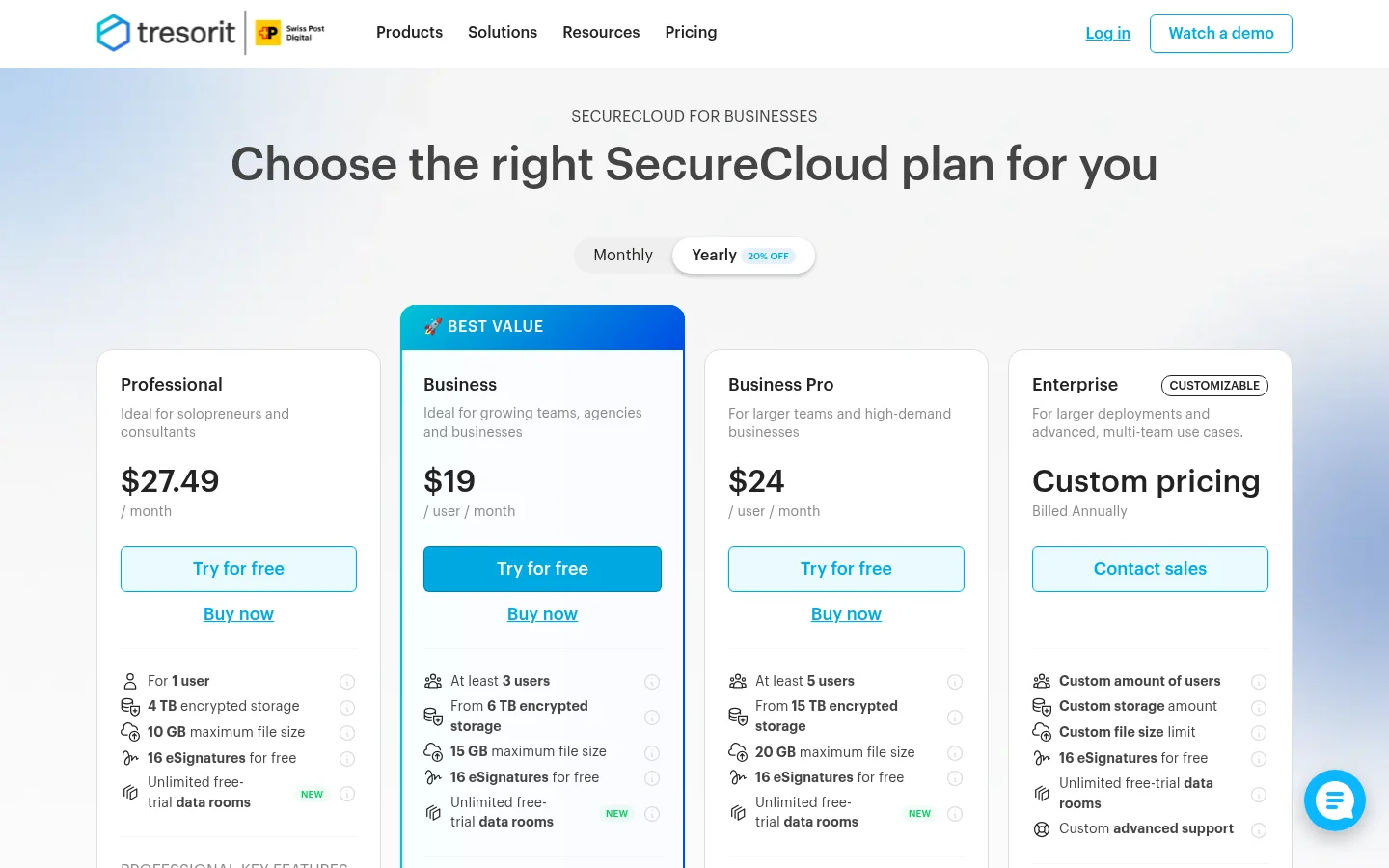
Professional: 4 TB of encrypted storage and a maximum file size of 10 GB.
Business: from 3 users, from 6 TB of encrypted storage and a maximum file size of 15 GB.
Business Pro: from 5 users, from 15 TB of encrypted storage and a maximum file size of 20 GB, with a custom domain for links.
For people outside your company, a shared link can have an expiration, a password, an open limit and an email notification, and an email can be required to view it. Its feature list also shows file requests, which let people without a Tresorit account send files to you, and a logo and brand colour on shared link download pages.
What Tarkle does
Tarkle is one place to store files and share them under your own brand. You send a link, and on a public link the person downloading needs no account. A link can have a password before anyone can open it, an expiry date and an email address before the download starts. Transfer status shows whether a transfer was delivered, viewed or downloaded.
The client portal is a branded place where each client signs in with their email, sees only what you shared with them and sends files back. File requests collect files from anyone with one link, into the folder you choose. Pro and Agency get a fully branded client portal.
A custom domain is included on Free for your workspace. The "Powered by Tarkle" line stays on your pages on Free. Only the Agency plan replaces it with your agency name, and only when the Agency organization is active and White label is turned on.
Plans and prices, from the Tarkle pricing page:
Free, $0: 1 workspace, 5 GB of storage, uploads up to 1 GB, password protection, and import from Dropbox or Google Drive.
Pro, $29 a month or $19 a month billed yearly ($228 a year): 2 workspaces, 3 TB of storage, uploads up to 200 GB and a fully branded client portal.
Agency, $59 a month or $49 a month billed yearly ($588 a year): everything in Pro, 20 workspaces for your clients, 6 TB of storage, a 100% white-label platform and a client provisioning portal. Your clients log in and manage their files on your own domain, like cloud.acme.com.

Workspace files are stored in one of four regions: the European Union, the United States, Hong Kong or Australia. You choose the region when you create a workspace. You can change it one time, and the change has a fee shown on your Billing page before you confirm.
Tresorit vs Tarkle
Tarkle | Tresorit | |
|---|---|---|
Encryption | Encryption in transit (TLS) and at rest (AES) | Zero-knowledge: Tresorit can't access your files and keys |
Largest upload | 1 GB on Free, 200 GB on Pro and Agency | 10 GB, 15 GB or 20 GB by tier |
Storage | 5 GB on Free, 3 TB on Pro, 6 TB on Agency | 4 TB, from 6 TB or from 15 TB by tier |
Custom domain for links | Included on Free for your workspace | Business Pro and above |
Branding | Fully branded client portal on Pro and Agency; white label on Agency | Logo and brand colour on shared link download pages |
Storage regions | EU, US, Hong Kong or Australia, chosen at creation | Data residency options |
Certifications | Not listed on this page | ISO 27001, GDPR, TISAX and FINRA compliance |
Tresorit rows come from its business pricing page, as read in October 2026. Tarkle rows come from the Tarkle pricing page, its feature pages, its Terms and its Privacy Policy.
Who should choose Tresorit
Choose Tresorit when zero-knowledge encryption is a rule for your files, or when you must show an auditor one of the certifications it lists, such as ISO 27001, TISAX or FINRA compliance. Tarkle's Privacy Policy describes encryption in transit (TLS) and at rest (AES), so check each vendor's certifications on its own pages before you move regulated files.
Who should choose Tarkle
Choose Tarkle when most of your files go to clients and come back from them. A designer sending a final package, an accountant collecting documents or an agency with several client accounts needs the client to open a link with no account, and needs to see what happened. Transfer status shows whether a transfer was delivered, viewed or downloaded.
Your brand is the other reason. A custom domain is included on Free for your workspace, the client portal is fully branded on Pro and Agency, and Agency adds the white-label platform. Pro takes files up to 200 GB, which suits video, raw photos and project folders.
Send the same real project through both tools. Open the link as your client would, from a private browser window, and judge what they see: whose name is on the page, whether they need an account, and how many clicks it takes to download.
Make one transfer under your own logo on the Free plan, and judge it yourself.
Switching from Tresorit to Tarkle
Move the files by hand: download the folders you share with clients from Tresorit to your computer, then upload them to Tarkle. Tarkle also imports from Dropbox and Google Drive, which helps if part of your files live there too.
Create your free account.
Add your custom domain, which Free includes, so links carry your name.
Download the folders you share with clients from Tresorit to your computer.
Choose the storage region when you create the workspace.
Send one transfer with a password and an expiry date.
Replace the old Tresorit links in your emails and proposals.
Move one active client first, and keep everything else on Tresorit until that client has opened a Tarkle link.
Frequently asked questions
Is Tarkle zero-knowledge encrypted like Tresorit? No. Tarkle's Privacy Policy describes encryption in transit (TLS) and at rest (AES). Tresorit can't access your files and keys.
Can I white label either one? Tarkle's Agency plan includes a 100% white-label platform. Tresorit's link pages can carry your logo and brand colour. Reselling Tarkle to your own customers is a separate set of plans, at /resellers.
Where are my files stored? In Tarkle you choose the European Union, the United States, Hong Kong or Australia when you create the workspace. Tresorit lists data residency options on its business pricing page.
What to remember about Tarkle
Tresorit is the stronger choice for zero-knowledge encryption and the certifications it lists. Tarkle is built for sending files to clients and collecting files back under your own brand, with a Free plan to start. Start for free and make one transfer under your logo.



