
Tarkle vs TitanFile: branded sharing or compliance-first
Tarkle vs TitanFile on price, file size, branding, client portal and compliance, with who should stay and how to switch.
Tarkle vs TitanFile comes down to the job. TitanFile is the better fit when your clients or regulators ask for named certifications, Canadian data residency, or Outlook in the work you share. Tarkle is the better fit when you want to send and collect files on your own domain. We make Tarkle, so read this as one vendor's view and check the sources linked below.
What TitanFile is
TitanFile is a paid, per-user secure file sharing platform for sending documents to outside contacts. Its core idea is a secure workspace, where you and an outside contact exchange files. Source: TitanFile pricing page, read in November 2026.
What TitanFile offers
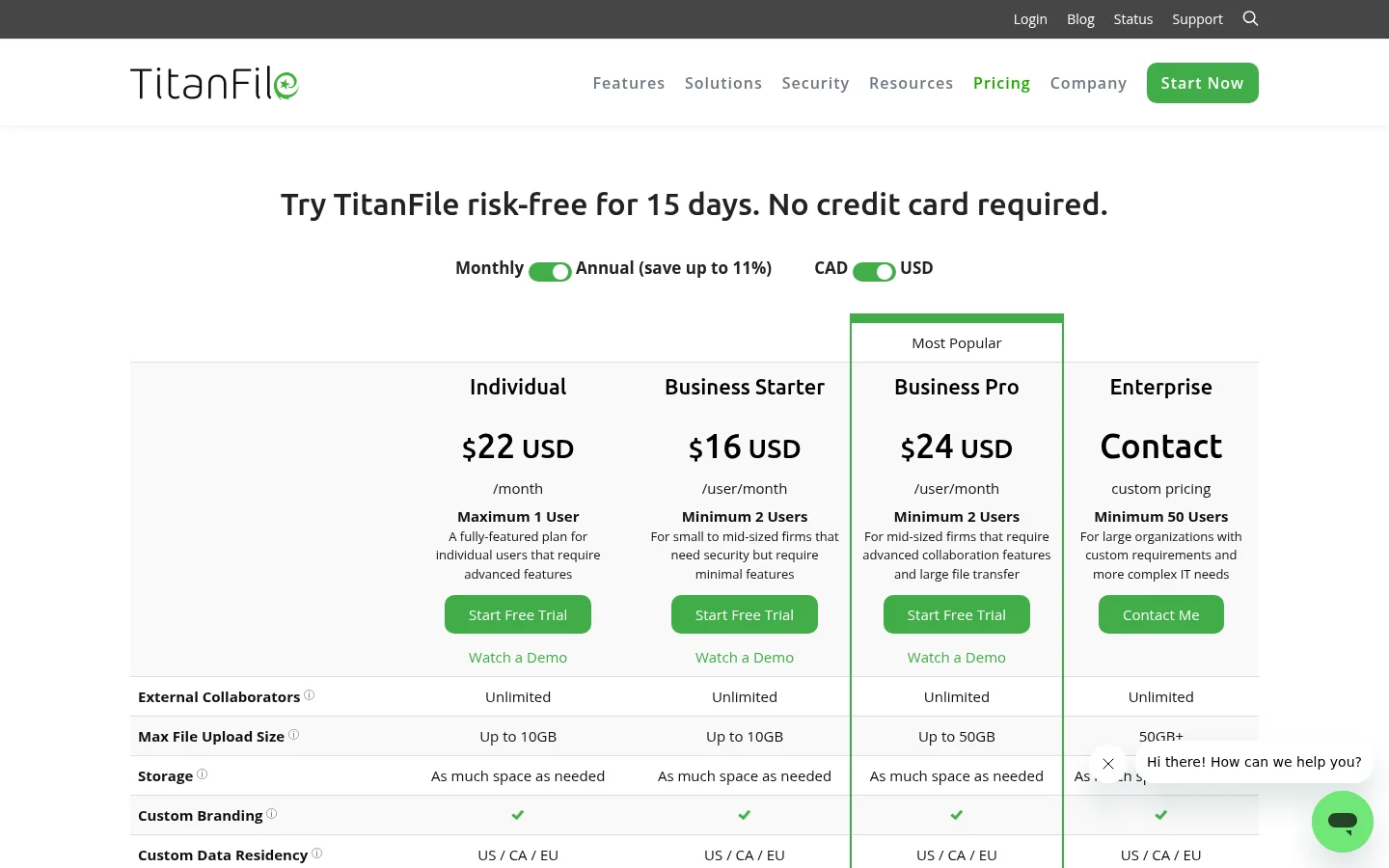
TitanFile's pricing page lists these plans in US dollars:
Individual: $22 USD a month, maximum one user, files up to 10 GB.
Business Starter: $16 USD per user a month, minimum two users, files up to 10 GB.
Business Pro: $24 USD per user a month, minimum two users, files up to 50 GB.
Enterprise: custom pricing, minimum 50 users, files of 50 GB and more.
The page says "Your external contacts are free."
The compliance table lists ISO 27001, SOC 2 Type II, HIPAA, PHIPA, PIPEDA and GDPR. Its integrations table lists iManage and NetDocuments.
What Tarkle does
Tarkle is a cloud storage and file-sharing platform for freelancers, agencies, and client-facing businesses. You send a file or folder with one link, and the person downloading needs no account. You can require a password, set a link expiration, ask for an email address before a download starts, make a transfer view-only, or revoke a link in one click. Transfer status shows whether a transfer was delivered, viewed or downloaded.
Your custom branding puts your logo, colours and favicon on every transfer page, request page and portal. A custom domain lets your links and client portal open on your own address, and it is included on Free. Custom domains are available on every plan. Free keeps the "Powered by Tarkle" line on your pages. On Pro, that line can be switched off from the Backlink card in Settings. On Agency, the "Powered by Tarkle" backlink is replaced by your agency name, and your clients log in and manage their files and team on your own domain.
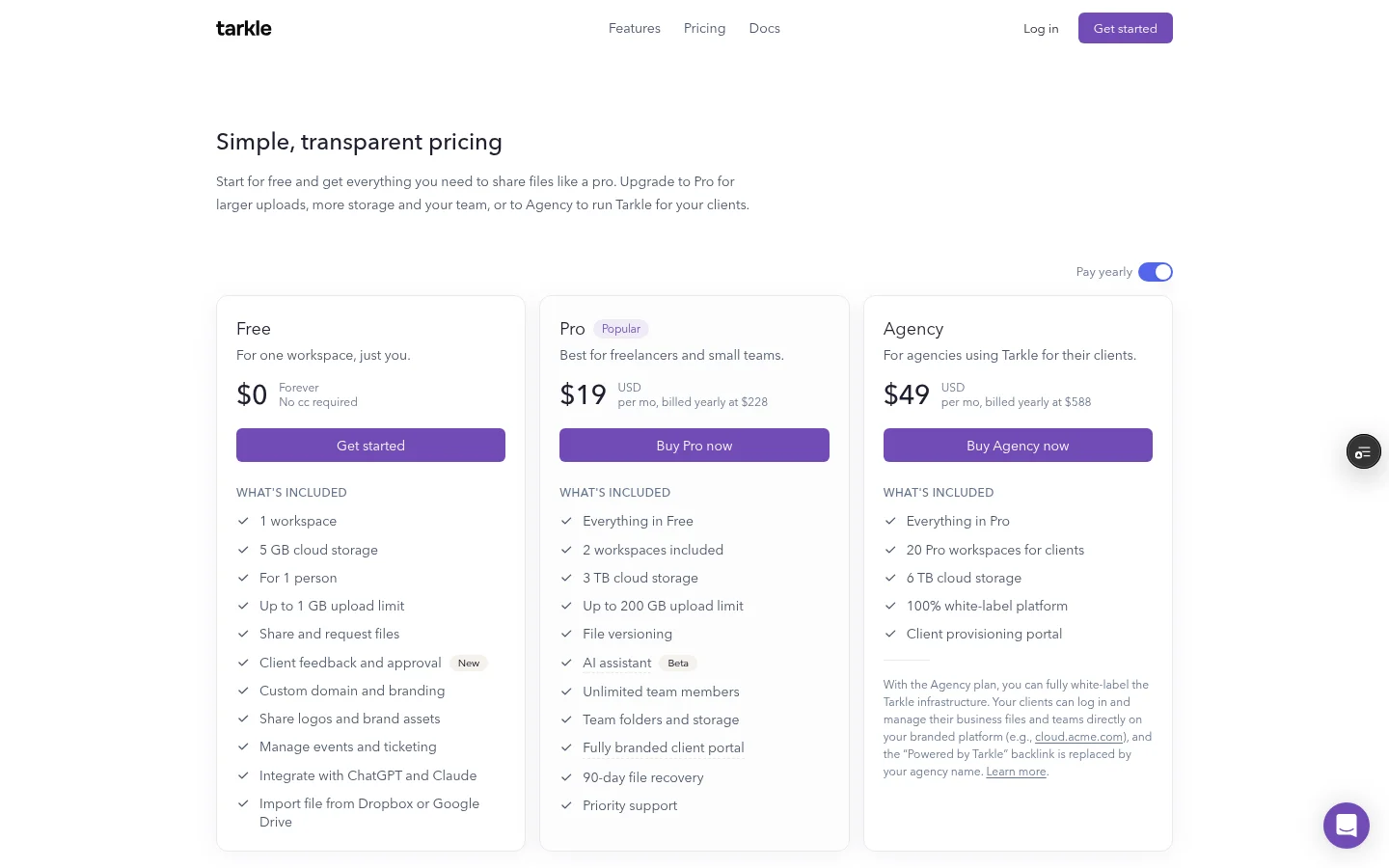
Tarkle's plans are priced per organization. Pro and Agency include unlimited team members. Here they are:
Free: $0 forever, no credit card required. One workspace, 5 GB of storage, files up to 1 GB.
Pro: $29 a month, or $19 a month billed yearly ($228 a year). 3 TB of storage, files up to 200 GB and unlimited team members.
Agency: $59 a month, or $49 a month billed yearly ($588 a year). 20 client workspaces, 6 TB of storage and a 100% white-label platform.
The client portal is a branded place where each client signs in with their email, sees only what you shared with them and sends files back. Clients sign in with a link sent to their email, so there is no password to remember, as passwordless sign-in describes. File requests collect files from anyone with one link, into the folder you choose. A deadline and a maximum upload size can be set on each request, and the size limit caps the total size one submission can carry. Paid transfers charge for access through your own Stripe account. They are a Pro feature, and they need Stripe connected and paid transfers turned on in Settings.
Your files are stored in the region you pick when you create a workspace. Tarkle offers data residency in Europe, the United States, Asia-Pacific and Oceania.
TitanFile vs Tarkle
Feature | Tarkle | TitanFile |
|---|---|---|
Largest file | 1 GB on Free; 200 GB on Pro and Agency | 10 GB on Individual and Business Starter; 50 GB on Business Pro |
Data residency | Europe, the United States, Asia-Pacific and Oceania | US, Canada and EU |
TitanFile facts are from its pricing page, read in November 2026. Tarkle facts are from its live plans, feature pages and policies.
Who should choose TitanFile
Choose TitanFile if your clients or regulators ask for named certifications, since its compliance table lists ISO 27001, SOC 2 Type II, HIPAA, PHIPA, PIPEDA and GDPR. Choose it if you need Canadian data residency, because Tarkle's listed regions are Europe, the United States, Asia-Pacific and Oceania. Choose it if your day starts in Outlook and you want Secure Send for Outlook, or if you work inside iManage or NetDocuments.
It also fits work that involves health data. Tarkle's privacy policy asks users not to upload special categories of personal data, which include health data, unless they have a lawful basis to do so.
Who should choose Tarkle
Choose Tarkle when the job is delivering and collecting files as your own business. On Agency you can run a workspace for every client, each with its own storage, sharing and portal.
Choose it when per-user pricing hurts. A five-person team on TitanFile Business Pro at the listed $24 USD per user a month would pay $120 a month before any annual discount. The two products are not the same, so compare the features you need as well as the price.
Choose it for getting files back and for selling work. If you sell work, paid transfers take payment before the download. For a related read, see client portal vs file sharing, and for another enterprise comparison, Tarkle vs Box.
Switching from TitanFile to Tarkle
The move from TitanFile is a download and an upload, so it works best one client at a time.
Download the files you want to keep from TitanFile. Check your own retention duties first.
Create your Tarkle workspace, then add your logo and colours.
Upload the files into folders, or import from Google Drive or Dropbox if copies already live there.
Invite active clients to the client portal on Pro.
Keep TitanFile until your files are moved, then cancel.
Move one client first. Send them a branded transfer and a file request, and ask what they saw, before you move the rest.
FAQ
What is the largest file I can send? TitanFile lists 10 GB on Individual and Business Starter, and 50 GB on Business Pro. On Tarkle, files are up to 1 GB on Free and up to 200 GB on Pro and Agency. See send large files.
Can I use my own domain? Custom domains are available on every plan on Tarkle. On Agency, your clients log in and manage their files and team on your own domain.
Start with the Free plan
Start with the Free plan, which is $0 forever, then compare the paid plans on the pricing page. Start for free when you are ready to send your first transfer.



