
Tarkle vs Sinosend: client portals or location tracking
Sinosend leads on location tracking and regions; Tarkle on client portals, paid downloads and a Free plan to start.
Sinosend is the better pick if you need to see where a recipient opened a file, or if you want to choose a storage region for each transfer. Tarkle is the one to choose if you want a branded client portal, paid downloads through your own Stripe account and a Free plan to start on. We make Tarkle, so read this as one vendor's view, and check the Sinosend figures against its own pricing page.
What Sinosend is
Its home page says these teams use us to move files across borders. Its pricing page shows a 4.9 rating across 250+ reviews.
Everything about Sinosend below comes from its home page and pricing page, as read in 2026.
What Sinosend offers
Sinosend has Personal, Pro and Business plans. Each plan has a "Try for a week" button.
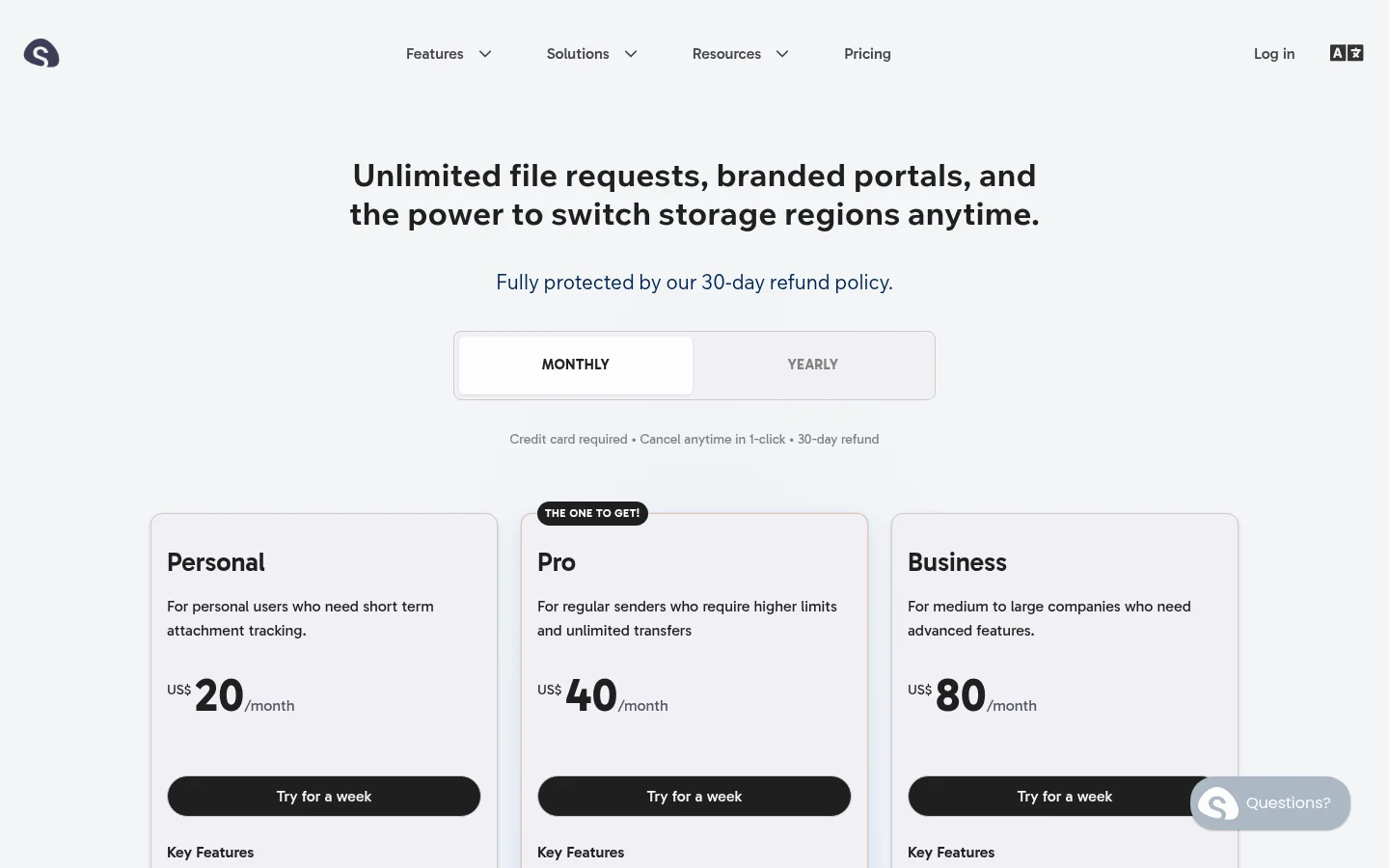
Limits grow with the plan:
Personal: 50 GB storage and up to 10 GB per transfer.
Pro: 200 GB storage and up to 25 GB per transfer.
Business: 1 TB storage, up to 100 GB per transfer, one custom subdomain.
Extra seats cost $9/seat/month.
Sinosend also lists transfers that expire after up to one year, extension requests from recipients, forwarding existing files without re-uploading, and updating or removing files in an existing transfer without changing the transfer link.
Its home page says you can track the location, the recipient and the timing of each view or download. Its pricing page lists on-the-fly region switching and storage in Mainland China on Business.
What Tarkle does
The person downloading does not need a Tarkle account. Tarkle also lets you protect shared files with passwords.

Free includes custom branding and a custom domain for your file sharing links, so your links can sit on your own address (custom domain). "Powered by Tarkle" stays on Free. Pro can switch it off. On Agency, the line is replaced by your agency name when the organization's White label is turned on. On any other plan, White label cannot be saved. Some client portal emails may still say "Powered by Tarkle" on Agency.
The client portal is a branded place where each client signs in with their email, sees only what you shared with them and sends files back. It comes with Pro and Agency.
File requests collect files from anyone with one link, into the folder you choose. The Free plan includes file sharing and file requests.
Transfer status shows whether a transfer was delivered, viewed or downloaded. Tarkle also records a country for each download. Its Slack alerts tell you when files are viewed or downloaded. They show the country and city when Tarkle has them. Slack is on Pro and Agency.
Paid transfers let you charge for access through your own Stripe account. You connect Stripe with your own keys and turn on paid transfers in Settings.
In an existing transfer, someone with permission to create shares can swap one file or folder for another item from the same workspace.
Tarkle offers data residency in Europe, the United States, Asia-Pacific and Oceania. The region is picked for a workspace. A change costs a one-time $49 per workspace on Pro or Agency. Only the organization owner buys it, and the team moves the files by hand.
Plans, as listed on the live pricing page:
Free: $0 forever with no credit card required, 5 GB of storage, uploads up to 1 GB.
Pro: $29 a month, or $19 a month billed yearly ($228 a year). 3 TB of storage, uploads up to 200 GB.
Agency: $59 a month, or $49 a month billed yearly ($588 a year). Everything in Pro, plus 20 client workspaces, 6 TB of storage and the 100% white-label platform.
Agency also lets you run Tarkle entirely on your own domain, like cloud.acme.com, with your clients logging in there. Custom domains are available on every plan.
Sinosend vs Tarkle
The first difference is the client side. On Tarkle, the client portal on Pro and Agency gives each client a sign-in with their email, where they see only what you shared and send files back.
The second is location. Sinosend's home page promises the location of each view or download. Tarkle records a country for each download, and its Slack alerts show the country and city when Tarkle has them.
The third is storage regions. Sinosend offers on-the-fly region switching. The region is picked for a workspace, and a change costs a one-time $49 per workspace.
Sinosend figures come from its pricing and home pages as read in 2026. Tarkle figures come from its live pricing page and product code.
Who should choose Sinosend
Choose Sinosend if you need to know where a recipient opened each file, for example to time a follow-up. Tarkle shows whether a transfer was delivered, viewed or downloaded, and records a country for each download. That is a different report.
Choose Sinosend if the storage region changes from deal to deal, since it offers on-the-fly region switching and storage in Mainland China on Business.
Choose Sinosend if you want to try a paid plan for a week first, since each plan has a "Try for a week" button. Sinosend also lists forwarding existing files without re-uploading and extension requests from recipients. Check Tarkle's features for both before you decide.
Who should choose Tarkle
Choose Tarkle when the job is delivering work to clients and getting files back. Each client signs in with their email, sees only what you shared with them and sends files back. Paid transfers can also charge for access through your own Stripe account.
Agency includes 20 client workspaces and the white-label platform, which can run on your own domain. Choose it when you run work for many client companies.
Choose Tarkle if you want to start without paying. The Free plan is $0 forever with no credit card required. It includes file sharing and file requests, so a client can receive a real transfer before you decide.
Switching from Sinosend to Tarkle
Create a free Tarkle workspace.
Connect your own domain, such as files.yourstudio.com, as the custom domain.
Download the files you still need from Sinosend and upload them into folders. If copies already sit in Dropbox or Google Drive, import them instead.
Recreate your open requests as file requests and send the new links.
Send one test transfer to yourself, then to a client.
Sinosend transfers expire, so check which ones are still live before you close the account. Create new links for anything still in use.
Run both for a week. Keep your Sinosend plan for deliveries where you need location data, and send the next transfer to a client from Tarkle on your own domain to see how they respond.
FAQ
Is Tarkle a good Sinosend alternative?
Yes, for teams that send files to clients and want a client portal and paid downloads. It is not the better fit if you need a storage region for each transfer.
Does Tarkle have geolocation tracking?
Tarkle shows whether a transfer was delivered, viewed or downloaded. Tarkle records a country for each download, and its Slack alerts show the country and city when Tarkle has them. Sinosend's home page promises the location of each view or download, so compare the two reports before you choose.
Does Sinosend have a free plan?
Sinosend's home page has a "Send your first file for free" button. Its pricing page has a "Try for a week" button on each plan.
Can I use my own domain on Tarkle?
Yes. Custom domains are available on every plan, and Agency also runs Tarkle entirely on your own domain, like cloud.acme.com, with your clients logging in there.
How big a file can I send with Tarkle?
Up to 1 GB on Free and up to 200 GB on Pro and Agency. Sinosend lists its limits by plan on its pricing page.
Can I charge clients before they download?
On Tarkle, paid transfers charge for access through your own Stripe account, and you turn them on in Settings. Check Sinosend's pricing page for its payment options.
Does Tarkle have a free trial?
Tarkle's way to test it is the Free plan, which is $0 forever with no credit card required. Sinosend lists a "Try for a week" button on each plan.
What to remember about Tarkle
Sinosend fits better when you need a storage region for each transfer or a per-open location report. Tarkle fits when the job is client work: each client signs in with their email, sees only what you shared and sends files back. Start for free on the Free plan.



