
Tarkle vs Internxt: client sharing or zero-knowledge storage
Internxt keeps your own files private with zero-knowledge storage. Tarkle sends and collects client files.
Tarkle vs Internxt comes down to the job. Internxt is better for private, encrypted storage of your own files, with apps for your computer and phone and file backups. Tarkle is better when you send files to clients and collect files back, on your own domain.
We make Tarkle, so read this as one vendor's view, and check the sources linked below. Internxt facts come from Internxt's own pages and its help center.
What Internxt is
Internxt is a cloud storage service for private files. Its pricing page says that your files are encrypted before they leave your device, and it lists zero-knowledge and post-quantum encryption on its plans (Internxt pricing). The same page says that our code is made public on GitHub, so anyone can review it.
What Internxt offers
Internxt has a Free plan with 1 GB of encrypted storage, and paid plans billed yearly or as a one-time payment. Its pricing page also promises a "30-day money-back guarantee" on its paid plans. Prices change, so check the Internxt pricing page for the figures it shows.
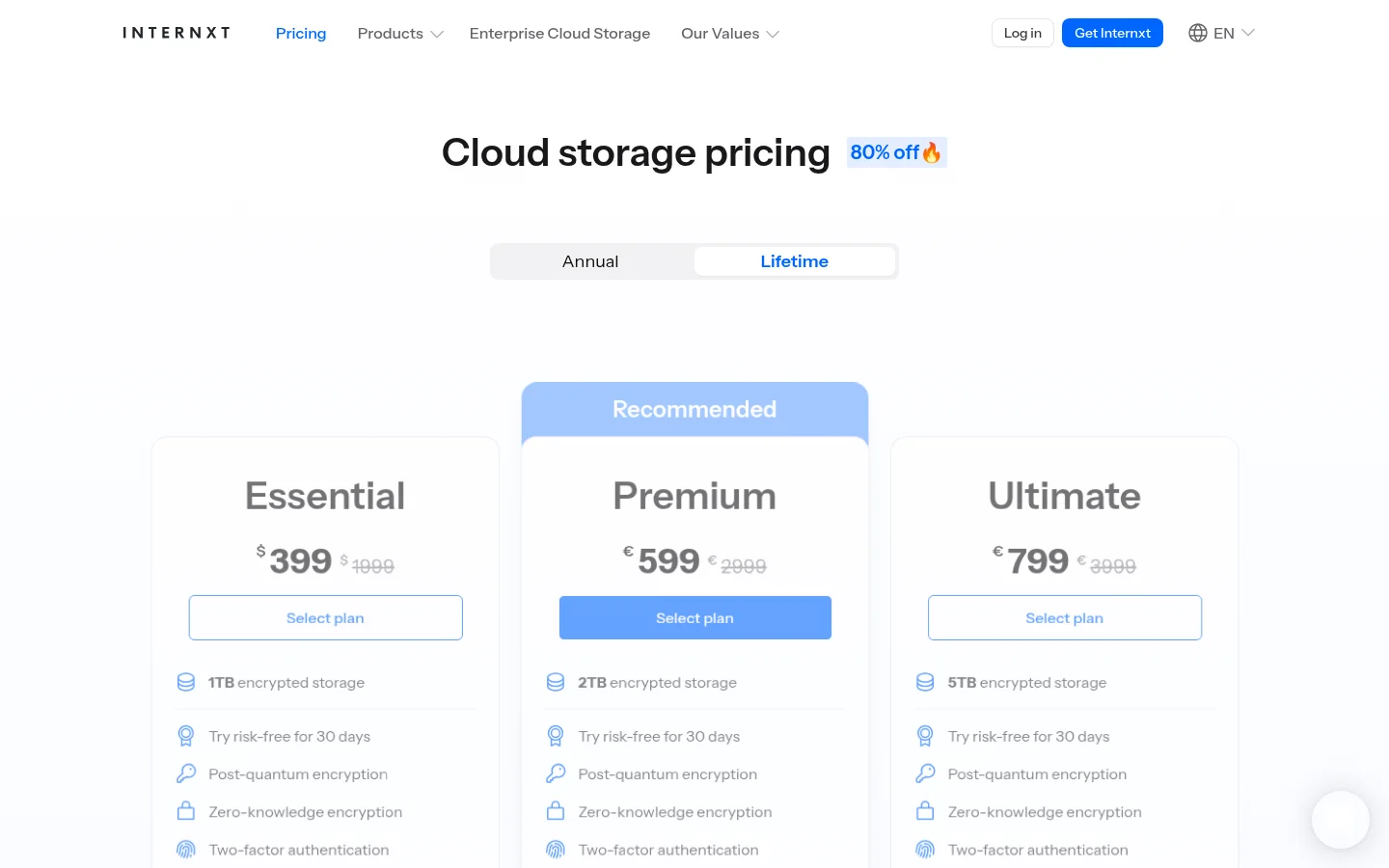
Per-file upload limits depend on the plan. Internxt's help center lists 100MB per file on Free, 10GB per file on Essential, 50GB per file on Premium and 100GB per file on the highest plan. It says the sharing limit is 10GB on all platforms (upload limits).
For sharing, the pricing page lists "Password-protected file sharing", and on its higher plans "Invite, share & collaborate" and "File versioning". It also lists "File backups", apps for Linux, Windows and macOS, and iOS and Android apps. It lists GDPR, HIPAA, ISO 27001 and SOC 2 compliance. Its comparison table does not list a branded client portal, file requests or a custom domain.
What Tarkle does
Tarkle is a cloud storage and file-sharing platform for freelancers, agencies, and client-facing businesses. You store files in a workspace, send a file transfer with one link, collect files from clients with a file request, and give each client a branded client portal.
Tarkle's plans, as listed on the Tarkle pricing page:
Free: $0 forever, for one person. It includes 1 workspace, 5 GB of storage, uploads up to 1 GB each, share and request files, and custom branding and a custom domain.
Pro: $29 a month, or $19 a month billed yearly. It adds 3 TB of storage, uploads up to 200 GB each, 2 workspaces, unlimited team members with team folders, file versioning, a fully branded client portal, 90-day file recovery and an AI assistant (Beta).
Agency: $59 a month, or $49 a month billed yearly. It includes everything in Pro, plus 6 TB of storage, 20 workspaces for clients, a 100% white-label platform and a client provisioning portal.

Deleted items stay in a recovery bin for 30 days on Free and 90 days on Pro (file retention and recovery). That is a recovery bin, not a backup of your computer.
On a transfer you can set a password, set a link expiration date, or send a one-time download link that stops working after its first download. On a public link, the person who opens the transfer needs no Tarkle account. Each transfer has an Activity panel that shows when it was created, when it was last viewed and when its files were last downloaded. The transfer status feature shows whether a transfer was delivered, viewed or downloaded.
Your logo, colors and favicon go on every transfer page, request page and portal. Custom transfer links look like files.yourstudio.com/t/brand-assets, and a custom domain lets your links open on an address you own. On Free, the Powered by Tarkle line stays.
On Pro and Agency you can charge for access to a transfer through your own Stripe account, once Stripe is connected and the paid transfers switch is on in Settings.
On Agency, the Powered by Tarkle line is replaced by your agency name when the organization's owner turns White label on, and only while the Agency plan is in force. The white label setup guide shows where to set your name, logo, favicon and accent color.
On security, Tarkle's privacy policy lists encryption in transit (TLS) and at rest (AES), and two-factor authentication and passkeys. It does not describe encryption on your device before upload. You choose one of four regions when you create a workspace: European Union, United States, Hong Kong or Australia. You can change it one time. A change has a fee, shown on your Billing page before you confirm.
Internxt vs Tarkle
What | Tarkle | Internxt |
|---|---|---|
Built for | Sending and collecting files for clients | Private Cloud Storage for your own files |
Encryption | TLS in transit and AES at rest | Zero-knowledge and post-quantum encryption |
Largest file | 200 GB per file on Pro and Agency | 100GB per file on the highest plan |
Password on a link | Yes | Password-protected file sharing |
Link expiry and one-time links | Link expiration and one-time download links | Not in its comparison table |
Collect files from clients | File requests: collect files from anyone with one link | Not in its comparison table |
Client portal | Fully branded client portal on Pro and Agency | Not in its comparison table |
Your domain and branding | Custom domain and custom branding on Free; white label on Agency | Not in its comparison table |
Viewed or downloaded | Activity panel shows when a transfer was viewed or downloaded | Not in its comparison table |
Who should choose Internxt
Choose Internxt when the main job is keeping your own files private. If you want zero-knowledge encryption, Internxt lists it on its plans, and Tarkle's privacy policy does not describe encryption on your device. Internxt is also the better fit if you need apps for Linux, Windows and macOS, file backups, or open-source code you can review on GitHub.
Who should choose Tarkle
Choose Tarkle when files move between you and your clients. That job needs a link on your own domain, your logo on the page, a client portal, a request link that brings files back, and a record of when each transfer was viewed or downloaded.
Sending work: send a transfer with a password or an expiry date, and check the Activity panel to see when it was viewed or downloaded.
Collecting work: send a file request and collect files from anyone with one link, instead of chasing email attachments.
Running it for clients: on Agency, create a branded workspace for each client, with their own storage, sharing and portal.
Big files: send files with one link on Pro and Agency, and the person downloading needs no account. See send large files.
For a backup of your computer or a folder that syncs across devices, Internxt is the better fit. If you are choosing between a client portal and plain links, client portal vs file sharing explains the difference.
Try one real transfer on the Free plan before you decide. Upload a folder, set a password, add your logo, and open the link in a private window to see what your client sees.
Switching from Internxt to Tarkle
You do not have to leave Internxt completely. To move client files:
Download the folders you share with clients from Internxt Drive.
Create a Tarkle account with your name and email, then confirm it with the 6-digit code Tarkle emails you. Create a workspace and choose its storage region.
Use the Upload menu to add the folders to your Tarkle library.
Upload your logo and favicon and set your accent color, then use a custom domain for your links.
Create a file transfer or a file request, and send the new link to your client.
Move one active client first. Keep the rest on Internxt until you are happy with how the link, the portal and the Activity panel work for you.
FAQ
Is Tarkle as private as Internxt?
Not in the same way. Internxt says your files are encrypted before they leave your device, and it lists zero-knowledge encryption. Tarkle's privacy policy does not describe encryption on your device, so keep files that only you should open in a zero-knowledge service.
Can Internxt send files under my own brand?
Its comparison table does not list a branded client portal, file requests or a custom domain. Ask Internxt directly about white label.
Does Tarkle have a free plan?
Yes. Free includes 1 workspace, 5 GB of storage, uploads up to 1 GB each, and custom branding and a custom domain, for one person. The Powered by Tarkle line stays on Free.
What is the largest file I can send?
On Tarkle, 200 GB per file on Pro and Agency, and uploads up to 1 GB each on Free. On Internxt, its help center says the sharing limit is 10GB on all platforms.
Does Tarkle back up my computer or sync a folder?
Internxt lists file backups on its pricing page. For a backup of your computer, Internxt is the better fit.
Where are my files stored?
On Tarkle you choose one of four regions when you create a workspace: European Union, United States, Hong Kong or Australia. You can change it one time. A change has a fee, shown on your Billing page before you confirm.
Can I use both?
Yes. The two services do different jobs. Start for free and send one transfer to see how it works for your clients.



