
Tarkle vs Icedrive: client file sharing or personal storage
Icedrive suits personal encrypted storage; Tarkle suits sending files to clients under your own brand.
Tarkle vs Icedrive comes down to one question: are the files yours, or do they go to clients? Icedrive is better for personal encrypted storage with desktop sync. Tarkle is better for sending files to clients, collecting files from them and putting your own brand on both. This comparison covers what each one does, where each one stops and how to move over. We make Tarkle, so read this as one vendor's view and check the sources linked below.
Last checked: October 2026.
What Icedrive is
Icedrive is cloud storage for personal files. Its plans page describes its storage for photos, projects and backups, with an encrypted space where only you hold the key (Icedrive plans, read in October 2026). Its plans list desktop sync devices.
What Icedrive offers
The Free plan gives 10 GB. Paid plans come in several sizes. On the plans page, the 2 TB plan is listed at $6.29 a month in a first-year offer, normally about $8.99 a month.
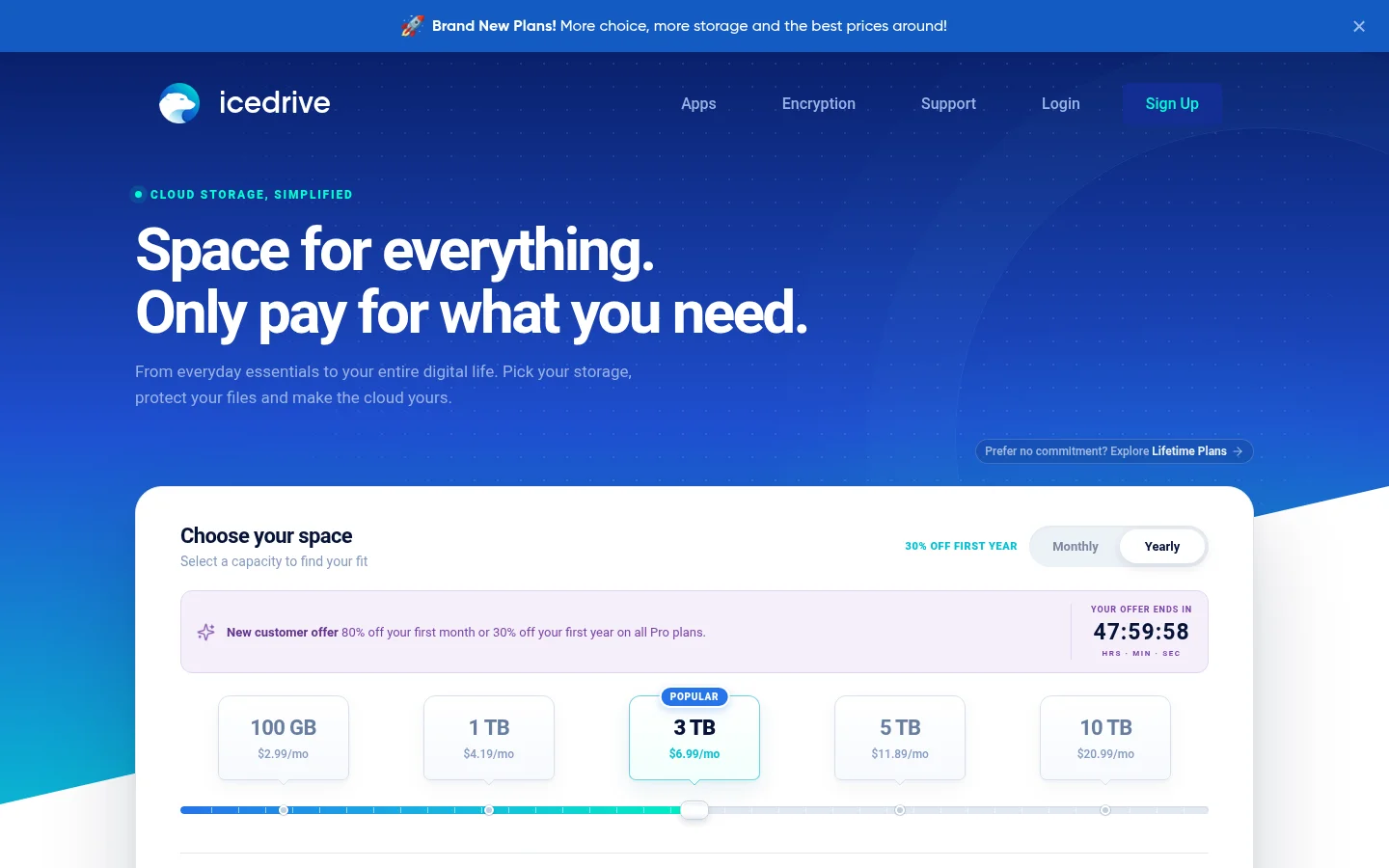
Paid plans include client-side Twofish encryption and zero-knowledge protection for files in your encrypted space. Files are encrypted before they leave your device.
For sharing, public links can carry a password, an expiry date and a download limit. You can invite people to folders as viewers or editors, and a file request link lets other people send files directly into your cloud. Icedrive's help says sharing encrypted files is not supported, because the person you share with would need your passphrase to decrypt (Icedrive help).
The 2 TB plan lists desktop sync devices. The plans page does not list branding, a client portal or activity tracking for shared links.
What Tarkle does
Tarkle is a cloud storage and file-sharing platform for freelancers, agencies and client-facing businesses. Pick files or folders and get one link to send anywhere. Recipients need no account to download.
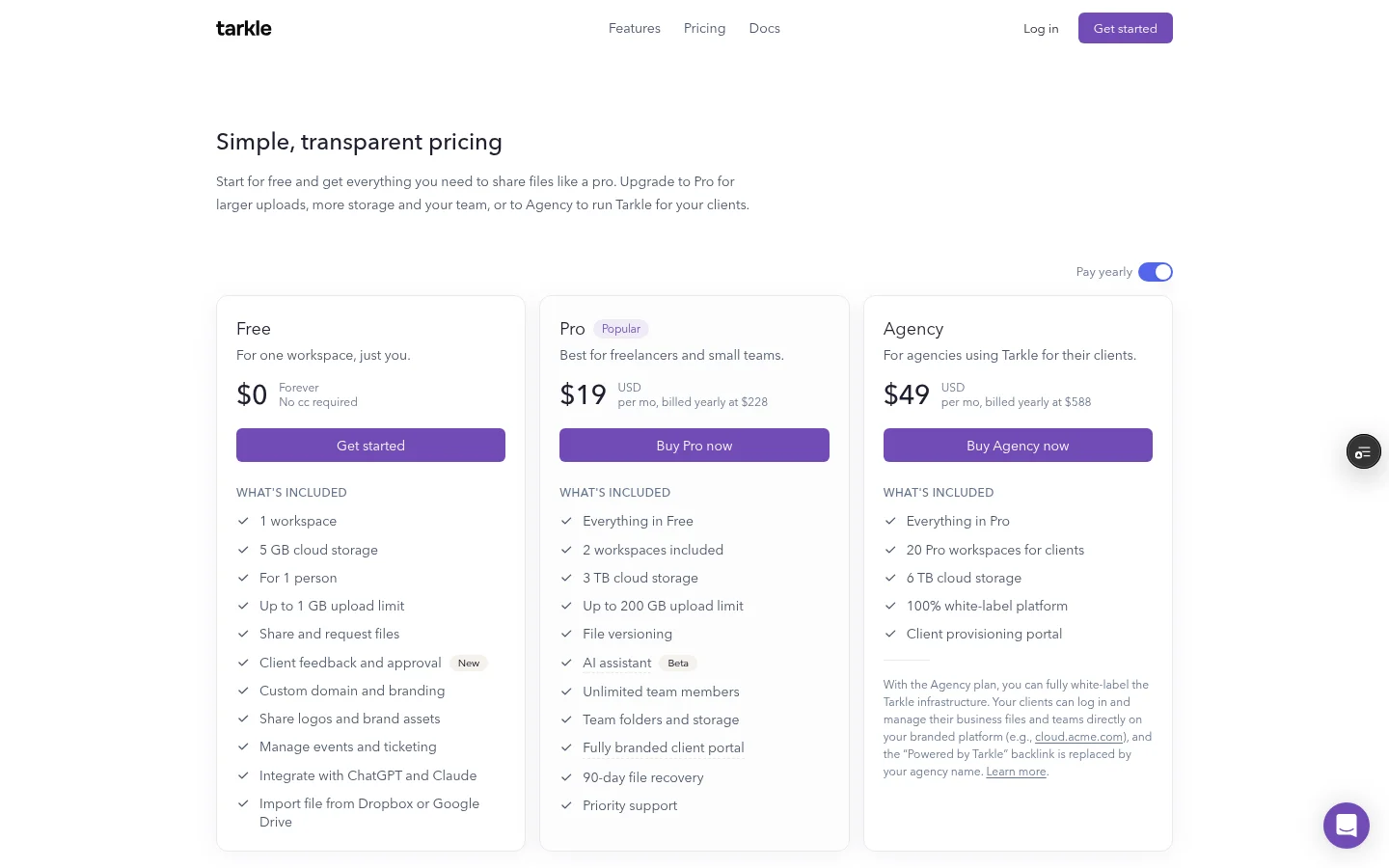
Send: a transfer can have a password, an email check before the files open, an expiry date or view-only access. The biggest file is 1 GB on Free and 200 GB on Pro and Agency. See password protection and link expiration.
Request: on Free you can share and request files. Set a deadline on a file request and the most a visitor can upload at once. See request deadlines and limits.
Brand: Free includes custom branding and one custom domain. The Powered by Tarkle line stays on Free pages.
Portal: Pro adds a fully branded client portal, where each client signs in with their email and sees only what you shared with them.
Agency: Agency includes everything in Pro, plus 20 workspaces for your clients, 6 TB of cloud storage shared by its workspaces, and a 100% white-label platform. Agency can also run Tarkle on your own domain, like cloud.acme.com. With white label switched on, the "Powered by Tarkle" line is replaced by your agency name while the Agency plan is in force.
Track: you see whether a transfer was viewed or downloaded.
Charge: on Pro and Agency, you can charge for access to a transfer through your own Stripe account. See paid transfers. A paid transfer cannot have a password, an expiry date, an email check or view-only access, because payment is the access gate.
Plans and regions: Free is $0 and needs no credit card. Pro is $29 a month, or $19 a month billed yearly, with 3 TB. Agency is $59 a month, or $49 a month billed yearly, with 6 TB. You can pick a storage region for your workspace in Europe, the US, Asia-Pacific or Oceania.
Icedrive vs Tarkle
Icedrive | Tarkle | |
|---|---|---|
Built for | Storage for photos, projects and backups | Sending files to clients and collecting files back |
Free plan | 10 GB | 5 GB, up to 1 GB per upload |
Entry paid plan | 2 TB at $6.29 a month in a first-year offer | Pro 3 TB at $29 a month, or $19 a month billed yearly |
Link protection | Password, expiry date, download limit | Password, email check, expiry date, view-only access |
Branding and custom domain | Not on its plans page | Custom branding and one custom domain on Free |
Client portal | Not on its plans page | Fully branded client portal on Pro and Agency |
White label | Not on its plans page | 100% white-label platform on Agency |
File requests | A link that lets other people send files into your cloud | Requests with a deadline and a limit on what a visitor can upload at once |
Shared folders | Invite people to folders as viewers or editors | Team folders on Pro and Agency |
Activity tracking | Not on its plans page | See whether a transfer was viewed or downloaded |
Payment before download | Not on its plans page | On Pro and Agency, through your own Stripe account |
Icedrive details come from its plans and help pages, read in October 2026. Tarkle details come from its pricing page.
Who should choose Icedrive
Choose Icedrive when the files are your own and you want them synced to your computers. Its plans list desktop sync devices. If it matters that the provider cannot read your files, Icedrive's paid plans are built for that, since client-side encryption runs on your device. Sharing encrypted files is not supported, so keep client work outside that encrypted space.
Who should choose Tarkle
Choose Tarkle when the files go to other people. Free includes custom branding and one custom domain, so your links can sit on your own domain with your branding, and recipients download without making an account. You see whether each transfer was viewed or downloaded. When you need files back, a file request gives clients a link to upload into, with a deadline and a limit on how much a visitor can upload at once.
On Pro, each client signs in to a branded client portal and sees only what you shared with them. On Agency, the platform can run on your own domain, and the "Powered by Tarkle" line becomes your agency name while white label is on.
The part that does not fit Tarkle is storage that only you use. Tarkle is designed primarily for agencies, consulting firms and other client-facing businesses.
Send one real transfer before you decide. On the Free plan, add your logo and custom domain, upload a file, protect it with a password and open the link in a private window to see what your client sees.
Start for free on the Free plan. It needs no credit card.
Switching from Icedrive to Tarkle
Tarkle imports files from Dropbox and Google Drive. For files that live in Icedrive, download them and upload them to Tarkle.
Download the files you want to deliver from Icedrive to your computer.
Create a Tarkle account. The Free plan needs no credit card.
Set up your branding and, if you want, your custom domain.
Upload the files into folders named after your clients.
Send a transfer or a file request, and tell clients about the new link.
Keep the Icedrive copy until each client has the files. Move the rest folder by folder, newest projects first.
FAQ
Is Icedrive a good tool for sending files to clients?
Icedrive can share files by public link with a password, an expiry date and a download limit, and it has file requests. Its plans page does not list branding, a client portal or activity tracking, so it suits occasional sharing better than regular client work.
Does Icedrive have a free plan?
Yes. A free Icedrive account includes 10 GB of storage. Tarkle's Free plan has 5 GB, up to 1 GB per upload, file sharing and file requests, custom branding and one custom domain.
Can I share encrypted Icedrive files with a client?
No. Icedrive says sharing encrypted files is not supported, because the person you share with would need your passphrase to decrypt. Keep client files outside the encrypted space.
Can I use Tarkle for personal storage?
Yes, although Tarkle is designed primarily for agencies, consulting firms and other client-facing businesses.
Do my clients need a Tarkle account?
No. Recipients download shared files without an account.
Does the Free plan show Powered by Tarkle?
Yes. The Powered by Tarkle line stays on Free pages. Agency white label replaces it with your agency name while white label is switched on.
Which Tarkle plan puts the platform on my own domain?
Agency. Free includes one custom domain, and Agency runs the whole platform on your own domain for your clients. See plans and pricing on the pricing page.



