
Tarkle vs Hightail: branded delivery or creative review
Hightail suits multi-round creative review. Tarkle suits branded delivery and files sent back to you.
Hightail is the better fit when a team runs several rounds of creative review with version compare. Tarkle is the better fit when the files are finished and the job is sending them to clients under your own brand, collecting feedback on images and PDFs, and getting files back. This is a Tarkle vs Hightail comparison written by Tarkle. We make Tarkle, so read it as one vendor's view and check the sources linked below.
What Hightail offers
Hightail lists Lite, Pro and Teams plans on its pricing page. Lite sends files up to 100 MB, and its sends expire after 7 days. Pro is $12 per month billed annually, with files up to 25 GB. Teams has files up to 50 GB and is priced per user. On paid plans you can set an expiration date for a send, or set files to never expire.
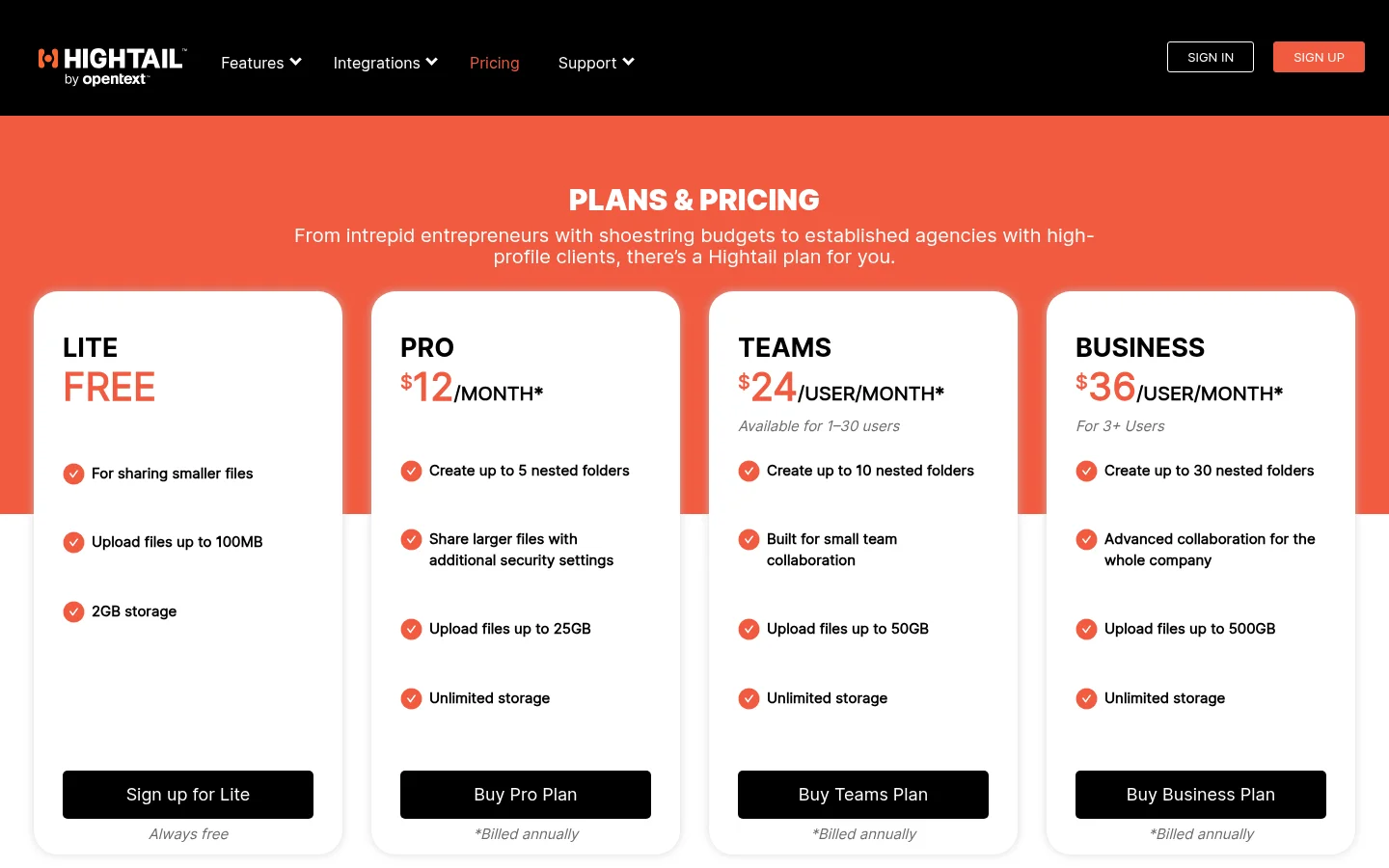
For sharing with outsiders, Hightail offers password protection and send tracking.
On the review side, Hightail offers precise comments on the visual preview of a file, side-by-side version compare on Teams, and Adobe Photoshop and Illustrator plugins. It also syncs with Dropbox, Google Drive and OneDrive.
What Tarkle does
A Tarkle transfer is one link to your files or folders, and the person downloading needs no account. On Pro and Agency, one link can carry files up to 200 GB. Free can also protect shared files with passwords. A view-only transfer lets people look at files without a download. Transfer status shows whether a transfer was delivered, viewed or downloaded, and the activity log keeps a searchable record with export.
Free includes a custom domain, and Powered by Tarkle stays on Free. On Pro, the Powered by Tarkle line can be switched off. Pro and Agency can give each brand page its own domain, and Pro and Agency include a custom favicon. On Agency, your agency name replaces the Powered by Tarkle line, and clients log in on your own domain. That switch works when your organization is active, its owner has turned White label on, and the Agency plan is in force.
The client portal is on Pro, and Agency includes everything in Pro. You add the client as a contact and turn Portal access on for them. They type their email on the sign-in page and press the button. There is no password to set up. In the portal they find what you shared and can upload files back into a private folder.
A feedback board holds PDFs or images, not both. Reviewers need no account. They open the link, leave comments, then choose Approve this work or Request changes. Free can have 5 active feedback boards, and Pro and above have no limit. File requests collect files from anyone with one link, and you can import from Google Drive and Dropbox without downloading first. A built-in player lets people watch or listen on the page before they download. Paid transfers charge for access through your own Stripe account.
Plans, as listed on the pricing page:
Free: $0, one person, 1 workspace, 5 GB of storage, files up to 1 GB.
Pro: $29 per month, or $19 per month billed yearly ($228 per year). 2 workspaces, 3 TB of storage, files up to 200 GB, unlimited team members, team folders, file versioning and the branded client portal.
Agency: $59 per month, or $49 per month billed yearly ($588 per year). Everything in Pro, 20 workspaces (your own counts toward them), 6 TB of storage shared across them, and the white-label platform.

Hightail vs Tarkle
Tarkle | Hightail | |
|---|---|---|
Free plan | $0, 5 GB, files up to 1 GB | Lite: files up to 100 MB, 7-day sends |
Entry paid plan | Pro $29/month, or $19/month billed yearly | Pro $12/month billed annually |
Largest file | 200 GB on Pro and Agency | 25 GB Pro, 50 GB Teams |
Storage | 3 TB Pro, 6 TB Agency | No storage cap on Pro and Teams |
Team members | Unlimited team members on Pro and Agency | Teams priced per user |
Client review | Feedback boards for PDFs and images | Precise comments on the visual preview |
Send tracking | Transfer status: delivered, viewed, downloaded | Send tracking |
Plugins and sync | Import files from Google Drive or Dropbox | Adobe plugins, sync from cloud drives |
Who should choose Hightail
Choose Hightail if your team reviews creative work in several rounds. Side-by-side version compare on Teams and precise comments on the visual preview of a file are built for that. The Adobe Photoshop and Illustrator plugins matter if your designers send work from inside Adobe. A feedback board holds PDFs or images, not video, so a review of video with comments on the stream is better on Hightail.
Who should choose Tarkle
Choose Tarkle when the files are finished and the point is how they arrive. Tarkle suits agencies and freelancers who:
Send large final files, with no account needed to download.
Give each client a branded place to sign in, find their files and send files back, through the client portal.
Need to know who opened and downloaded a transfer, through transfer status and the activity log.
Want clients to approve or ask for changes on images and PDFs. Reviewers need no account.
Switching from Hightail to Tarkle
Create your workspace and, if you want links on your own domain, set up a custom domain.
Download the files you still need from Hightail.
Create a transfer and add a password if the files are sensitive. For a client who needs the portal, add them as a contact and turn Portal access on.
Send the link.
Send a file request link so clients can send files back to the same place.
Keep your Hightail links alive until clients confirm they have what they need.
What to remember about Tarkle
Choose Hightail for multi-round creative review with version compare. Choose Tarkle when the files are finished and the point is how they arrive. Start for free.



