Tarkle vs Google Drive for branded client file sharing
Google Drive or Tarkle for client files: where each fits, with links, passwords, expiry dates and file requests.
Google Drive is the better choice when your team lives in shared documents, spreadsheets and synced folders. Tarkle is the better choice when the job is business file sharing with clients: a link you can name, a password, an expiry date, and a record of whether the transfer was viewed or downloaded. This page compares Tarkle vs Google Drive for that second job. We make Tarkle, so read it as one vendor's view and check the sources.
What Google Drive is
Google Drive is Google's cloud file storage and sharing service. Its core job is storing files and letting people work on them together, above all Google Docs, Sheets and Slides, which several people can edit at the same time. Google describes this on its Drive product page (checked October 2026).
If you already have a Google account, Drive is the place client files can end up by default. That is a real strength. It is also why teams later notice that a tool built for collaboration is not always built for delivery.
What Google Drive offers
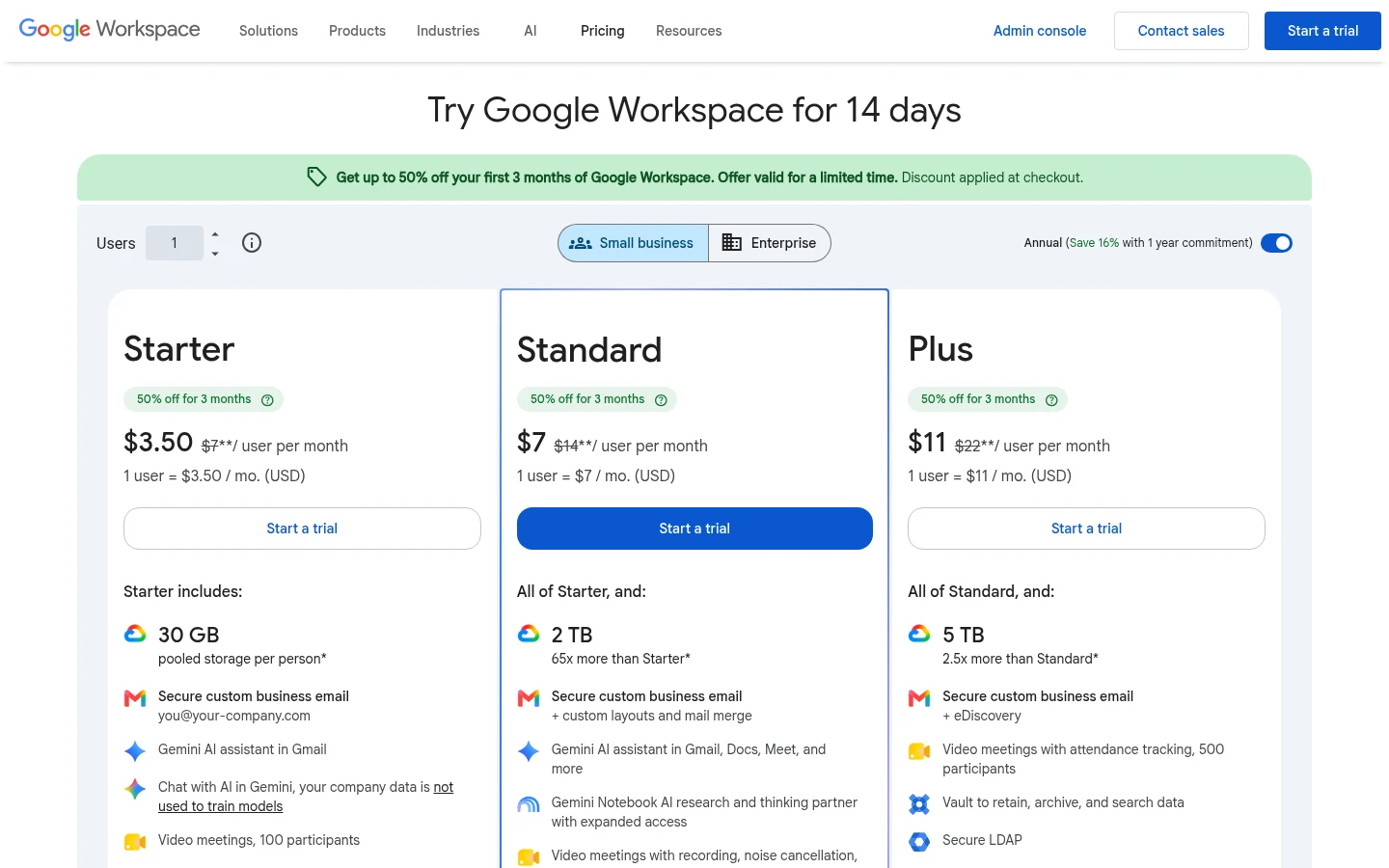
Plans and prices. A personal Google account includes 15 GB, shared across Drive, Gmail and Google Photos (Google's plans page, read October 2026). Business use runs on Google Workspace, priced per user on the Workspace pricing page. Starter includes 30 GB of pooled storage per user. Because Workspace is priced per user, the bill grows with every person you add.
File limits. Google's file size page says files other than Google documents can be up to 5 TB each (October 2026).
Sharing with people outside your team. Per Google's sharing help (October 2026), you can give people the Viewer, Commenter or Editor role, or switch a file to "Anyone with the link". Anyone with that link can open the file without signing in to a Google Account. Access expiry dates exist for work and school accounts, up to one year. Google's sharing help does not list a password option for a link.
Tracking. The activity dashboard shows who viewed Google Docs, Sheets and Slides files. Per Google's admin page, users need Edit access to the file and must be in the same domain as the file owner.
What Tarkle does
Tarkle is a cloud storage and file-sharing platform for freelancers, agencies and client-facing businesses. The parts that matter for client work:
Share files by link. Pick files or folders, get one link, and send it anywhere. On a public link, the person downloading needs no account. On Pro and Agency, custom transfer links let you name the link, like files.yourstudio.com/t/brand-assets.
Powered by Tarkle. The Powered by Tarkle line stays on Free. On Pro, it can be switched off. On Agency, it can be replaced with your agency name.
Control who gets in. Password protection asks for a password before anyone can open a transfer. Link expiration sets a date after which a transfer or request link stops working. View-only transfers let people look without a download, one-time download links stop working after the first download, and you can revoke a link in one click.
See what happened. Transfer status shows whether a transfer was delivered, viewed or downloaded. The activity log can be exported as a CSV file.
Collect files back. File requests collect files from anyone with one link. You set a total size limit for the whole request.
Client portal. On Pro and Agency, the branded client portal gives your recipients a branded place to receive and manage the files you share with them.
Video, payments and team. Video and audio play on a page with a built-in player, so people can watch or listen before they download. On Pro and Agency, paid transfers charge for access to a transfer through your own Stripe account. Pro and Agency include unlimited team members.
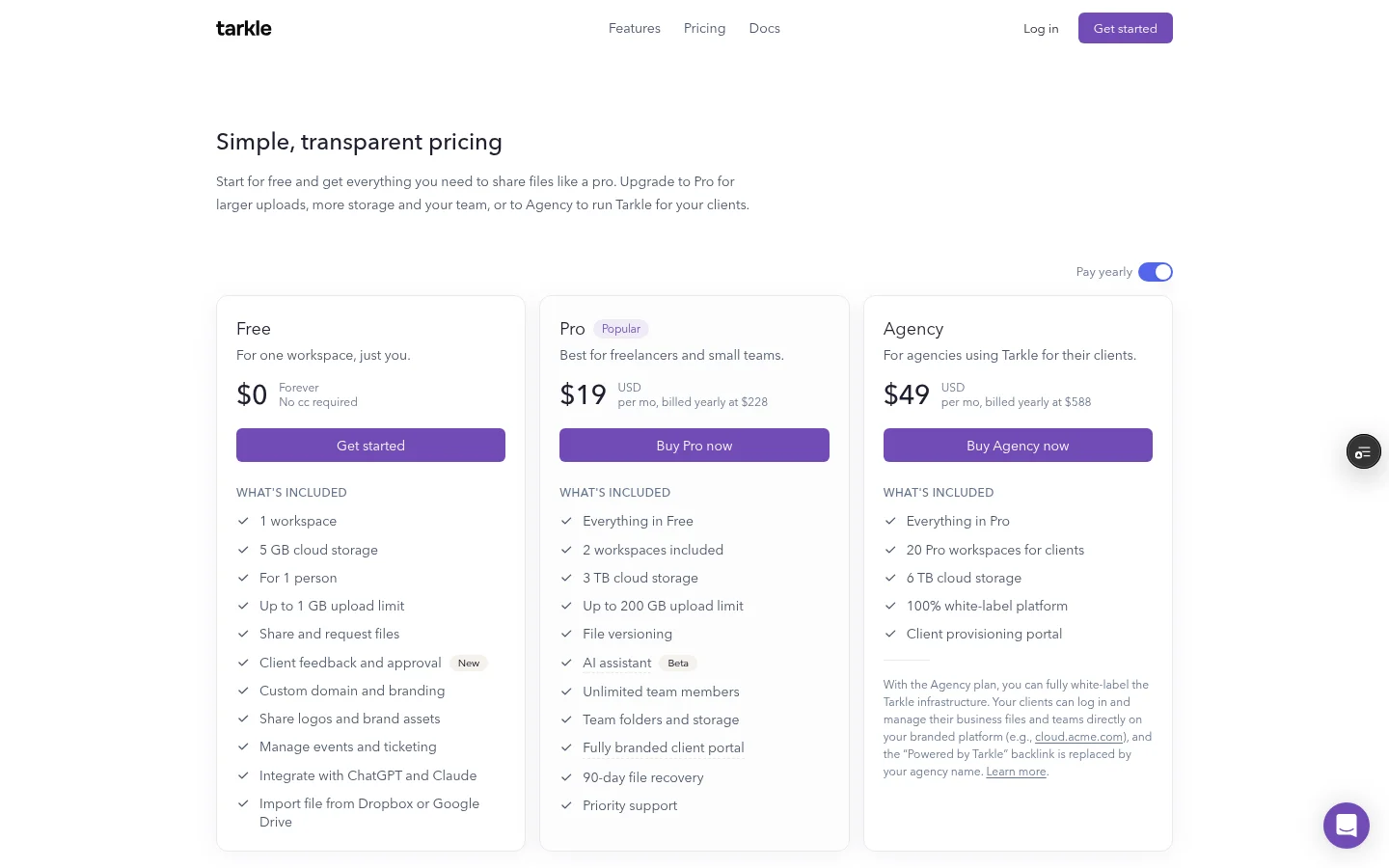
Agencies. The Agency plan adds room for 20 client workspaces, with 6 TB of cloud storage shared across them, plus a 100% white-label platform. Your clients log in and manage their files and team on your own domain.
Plans. Free costs $0, with 1 workspace for one person, 5 GB of storage and uploads up to 1 GB. Pro costs $29 per month, or $19 per month billed yearly ($228 per year), with 3 TB of storage and files up to 200 GB. Agency costs $59 per month, or $49 per month billed yearly ($588 per year), with 6 TB of cloud storage. Plans belong to your organization, not to each person. You can also pick a storage region for your workspace, see where your files are stored.
Google Drive vs Tarkle
Feature | Google Drive | Tarkle |
|---|---|---|
Largest file | Limit on Google's file size page | 1 GB on Free, 200 GB on Pro and Agency |
Link password | Not listed in Google's sharing help | Yes, password protection |
Who opened or downloaded | Activity dashboard for Docs, Sheets and Slides, same domain only | Delivered, viewed and downloaded status |
Google Drive facts come from the Google pages linked above. Tarkle facts come from Tarkle's plan and feature pages.
Who should choose Google Drive
Stay with Google Drive if your team writes and edits in Google Docs, Sheets and Slides together. Stay if people work from a synced folder on their computer. Drive also fits internal sharing, where everyone has a Google account and the admin settings are yours.
If clients are happy to work inside your Google account and edit shared documents with you, Drive is a sensible default. Teams can keep it for exactly that.
Who should choose Tarkle
Choose Tarkle when the people on the other end are clients, not colleagues. On Pro and Agency you can name the link yourself, and the Powered by Tarkle line can be switched off on Pro or replaced with your agency name on Agency. Each of these ties to something you do every week:
Delivering finished work. Send a folder with a password and an expiry date, or a view-only transfer for a draft, and revoke the link when the project ends.
Knowing it arrived. Transfer status tells you whether the client viewed or downloaded, so you stop asking "did you get my email?".
Compare Tarkle with how your clients see a Drive link today, then decide. Start for free. For more on the same decision, read how to share files with clients without Google Drive and whether Google Drive is safe for client files. Comparing other tools? See Tarkle vs OneDrive.
Switching from Google Drive to Tarkle
You do not have to leave Drive. You can move only the files you send to clients.
Create a free Tarkle account.
Import files from Google Drive into your Tarkle library. See import from Google Drive and Dropbox and the Google Drive integration. Folders cannot be imported, so pick files. Google Docs become Word (.docx) files, Sheets become Excel (.xlsx), Slides become PowerPoint (.pptx) and Drawings become PNG images. Converted files have a 10 MB size cap.
Send the new link to each client.
Stop sharing the old Drive links, so clients use one address.
For incoming files, create a file request instead of asking for Drive access.
FAQ
Is Tarkle free? Yes. Free includes file sharing and file requests, and uploads up to 1 GB. Powered by Tarkle stays on Free.
What is the biggest file I can send with Tarkle? 1 GB on Free and 200 GB on Pro and Agency. Google Drive allows up to 5 TB per file.
Do clients need an account to download? On a public link, no. The person downloading needs no account.
Can I add a password to a Google Drive link? Google's sharing help does not list a password option for a link. You can restrict a file to named people instead.
Can I import my files from Google Drive? Yes. Files from Google Drive can be imported into your Tarkle library.
Can I see when my files are downloaded? Transfer status shows whether a transfer was delivered, viewed or downloaded, and the activity log can be exported as a CSV file.



