
Tarkle vs Smash: your own domain and a client portal
Smash sends one big file fast with no sign-up. Tarkle adds your own domain, even on Free, and a client portal on Pro.
This page compares the two on one question: is the send a one-off, or files you share with clients again and again? Smash is the simpler, cheaper choice for one large file sent fast, and its free tier needs no sign-up. Tarkle is the better fit for client work: links on your own domain, a client portal on Pro and Agency, and file requests that bring files back. We make Tarkle, so read this as one vendor's view and check the sources linked below.
Last checked: October 2026.
What Smash is
Smash is a service for sending and receiving large files. On Smash, you choose how long a transfer stays available, from 1 day up to 30 days maximum. Transfers are temporary by design.
What Smash offers
On its pricing page, Free needs no sign-up and allows 2 GB per transfer, with transfers valid for 7 days. Beyond 2 GB, transfers join a queue behind Pro transfers.
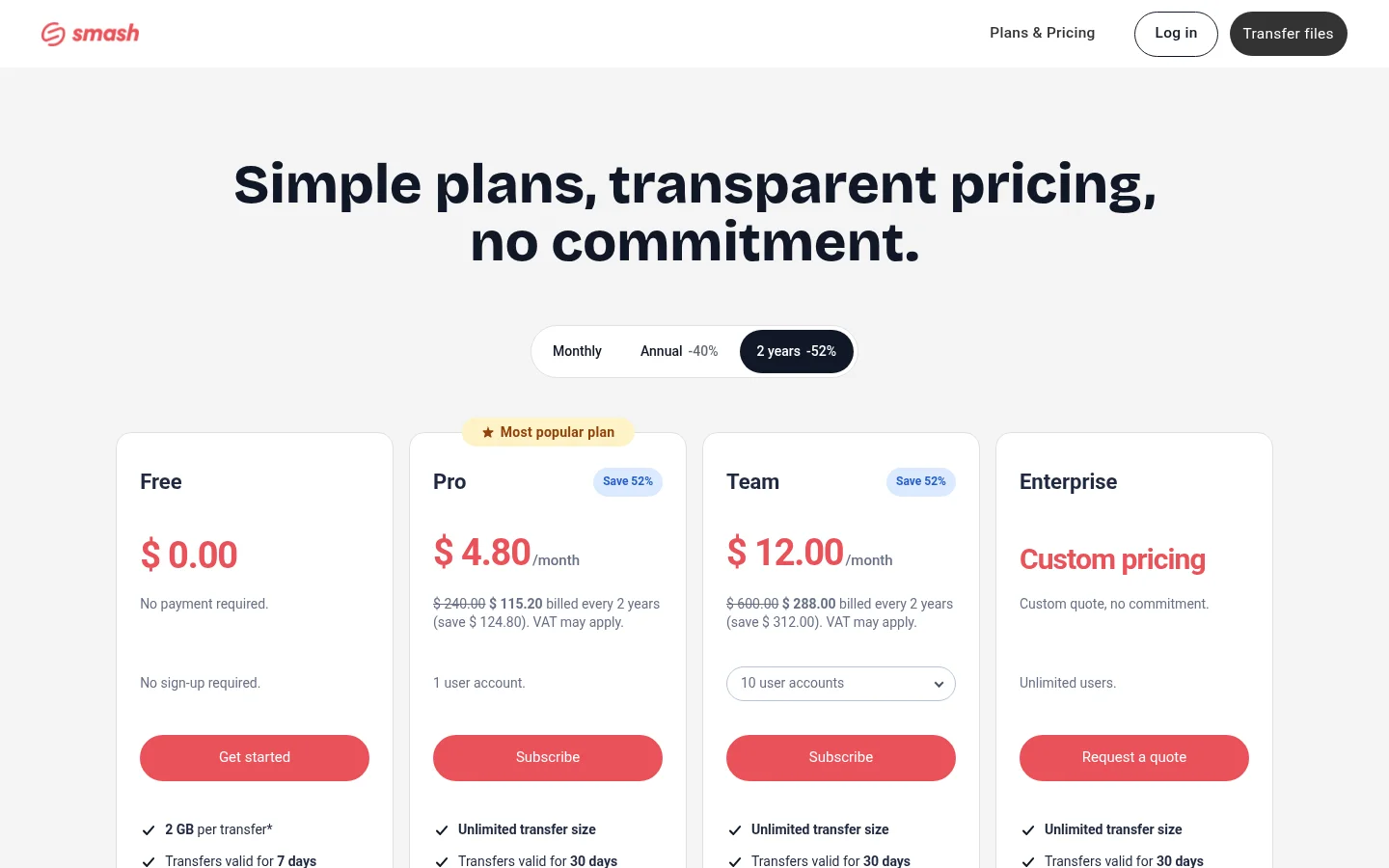
Pro has no transfer size cap in Smash's list, transfers valid for 30 days, and 1 TB of storage. Team covers 10 to 50 user accounts with 2 TB of storage. Enterprise adds a custom domain through a CNAME, single sign-on and SCIM provisioning.
Smash's help article on subscription costs lists Pro at $10 a month or $72 a year, excluding VAT.
On paid plans, Smash lets you choose the name of your send and download pages, such as your-name.fromsmash.com, and add a logo and a background.
What Tarkle does
Tarkle is a cloud storage and file-sharing platform for freelancers, agencies and client-facing businesses. You pick files or folders, get one link and send it. Recipients of a public link need no Tarkle account to open or download the files.
Your own domain and branding. Free includes custom branding and a custom domain.
Powered by Tarkle. On Free, the "Powered by Tarkle" line stays on your pages. On Pro you can switch it off. On Agency, your agency name can replace it once White label is on.
A client portal. On Pro and Agency, each client signs in on your own address and finds what you shared with them. Free cannot turn the portal on. Each contact needs portal access turned on, and there is no password to set up.
File requests. File requests collect files from anyone with one link, into the folder you choose.
Access control. Require a password before anyone opens a transfer, set a link expiration date, or ask for an email address before a download starts. See password protection, link expiration and email capture.
Activity. Each transfer shows when it was last viewed and when its files were last downloaded.
Payments. Paid transfers charge for access through your own Stripe account, on Pro and Agency.
Free costs $0 with no credit card and includes 5 GB of storage, files up to 1 GB. Pro is $29 a month, or $19 a month billed yearly ($228 a year), with 3 TB of storage and files up to 200 GB. Agency is $59 a month, or $49 a month billed yearly ($588 a year). It adds 20 workspaces sharing one 6 TB pool and a 100% white-label platform, where your clients log in on your branded platform. See the pricing page for the live numbers.
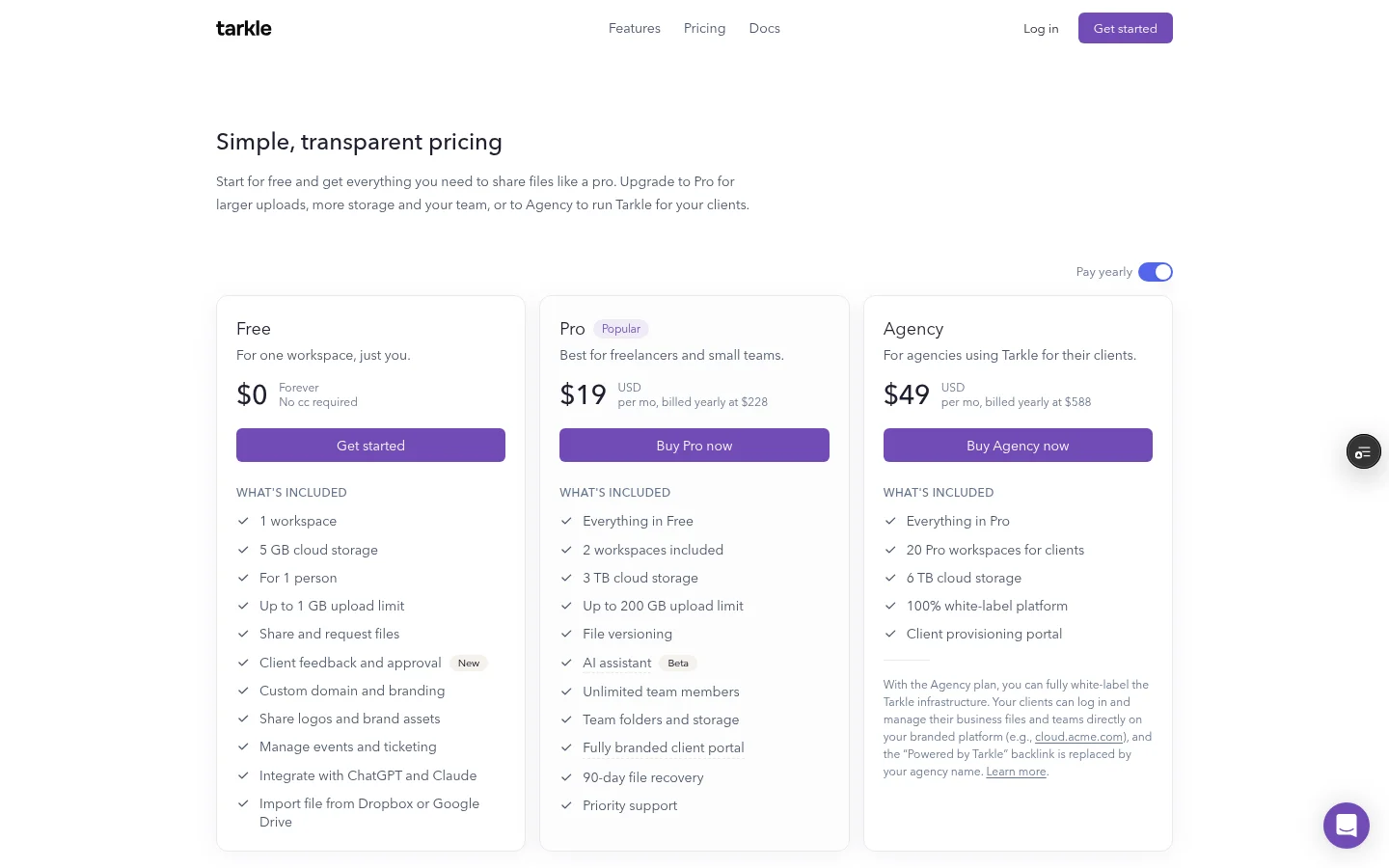
Smash vs Tarkle
Tarkle | Smash | |
|---|---|---|
Free plan | $0, 5 GB storage, files up to 1 GB, one person | No sign-up, 2 GB per transfer, transfers valid 7 days |
Paid entry price | Pro $29 a month, or $19 a month billed yearly | Pro $10 a month or $72 a year, excluding VAT |
Own domain | Custom domain on Free | Your-name subdomain on paid plans, CNAME on Enterprise |
Client portal | Pro and Agency | Not in its plan comparison |
Who should choose Smash
Choose Smash when the job is one big file, now, to one person. Smash Pro is $10 a month excluding VAT, against $29 a month for Tarkle Pro.
Who should choose Tarkle
Sending to the same clients again. A client portal on Pro and Agency gives each client one place to sign in and find what you shared.
Links on your own domain. Free includes a custom domain for your links.
Getting files back. A file request link collects files from anyone into the folder you choose.
Getting paid first. On Pro and Agency, a transfer can charge for access through your own Stripe account before the download.
Smash is the better fit for one large file on a free plan. Its Free plan allows 2 GB per transfer, while Tarkle's Free plan allows files up to 1 GB. Tarkle Pro costs $29 a month. That price includes the client portal.
Switching from Smash to Tarkle
Create a free Tarkle account. No credit card is needed for Free.
Upload the files you need to send next, then create a file transfer.
Add a password or an expiry date if the client needs one, and send the link.
When you want a client portal, move to Pro or Agency.
Send your next handover through both tools once. Compare the link the client sees, the page they land on and how you find out they opened it.
Smash vs Tarkle: common questions
Is Smash free? Yes. Its Free plan needs no sign-up. Transfers above 2 GB join a queue behind Pro transfers.
Does Smash have a client portal? It is not in Smash's plan comparison. Tarkle's client portal is on Pro and Agency.
Does the person downloading need an account? Recipients of a public link do not need a Tarkle account.
Is Smash cheaper than Tarkle? For one sender, yes: Smash Pro is $10 a month excluding VAT, against $29 a month for Tarkle Pro. Tarkle Pro adds the client portal and 3 TB of storage.
Try one real transfer on Tarkle
Send one real transfer on the Free plan before you decide. Start for free. When you need a client portal or payments, compare the paid plans above.



