
Tarkle vs Filecamp alternative: client files on your domain
Tarkle vs Filecamp: plans, storage and which tool fits client files, with a fair view of both.
Filecamp is the better fit when you need a shared media library. Tarkle is a Filecamp alternative for a different job: sending files and collecting files back from clients. We make Tarkle, so read this as one vendor's view and check prices on each vendor's own page.
What Filecamp is
Filecamp is a product for Digital Asset Management. Its home page says: Filecamp helps marketing professionals get more value from their creative assets, such as images, logos, brand guidelines, and videos. The same page also lists Media Library software.
What Filecamp offers
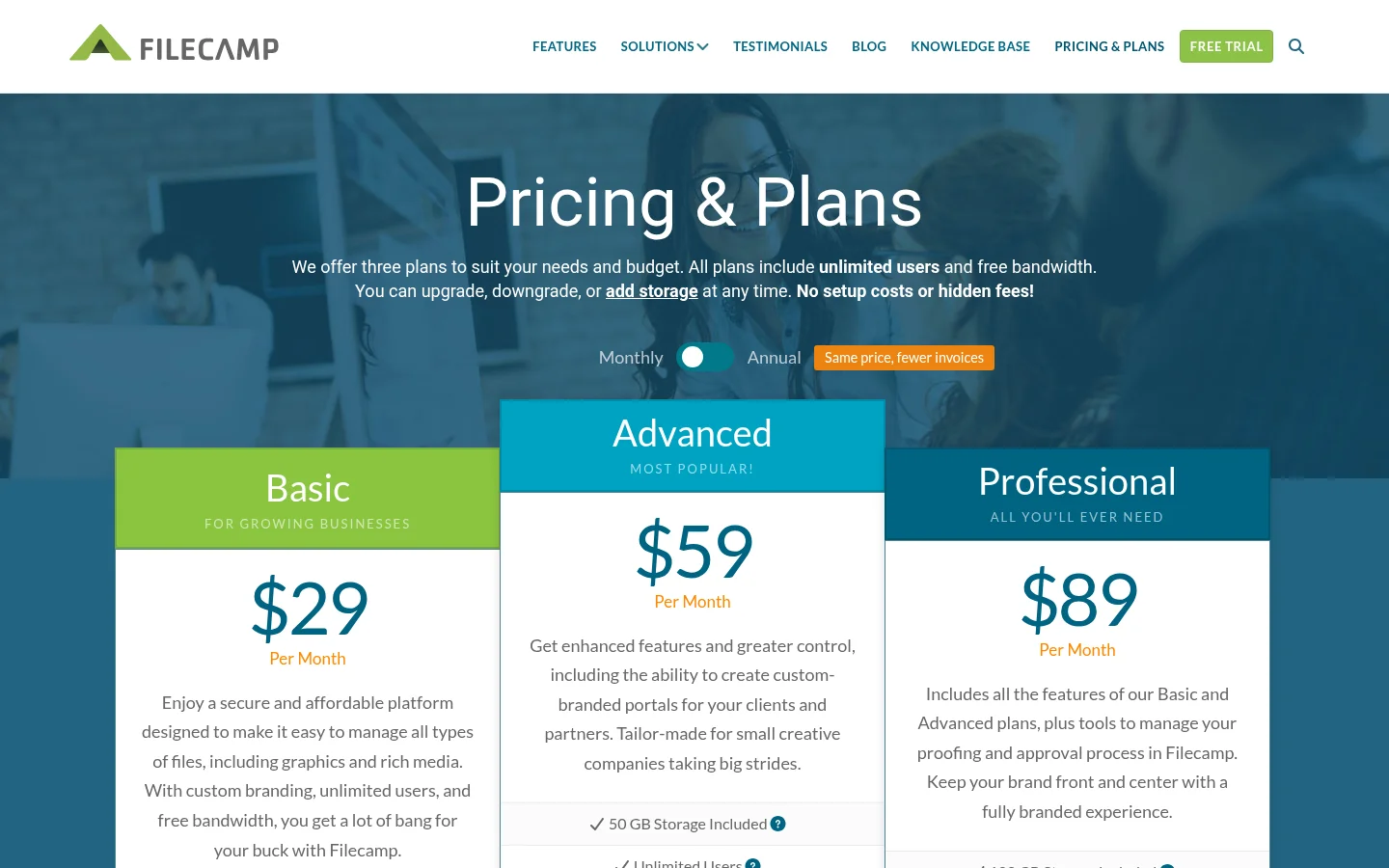
Its pricing page lists three plans:
Basic: 20 GB Storage Included.
Advanced: 50 GB Storage Included.
Professional: 100 GB Storage Included.
With custom branding, unlimited users, and free bandwidth, you get a lot of bang for your buck with Filecamp.
Get enhanced features and greater control, including the ability to create custom-branded portals for your clients and partners.
Includes all the features of our Basic and Advanced plans, plus tools to manage your proofing and approval process in Filecamp.
What Tarkle does
File sharing: Send files and folders with one branded link, decide who can open it and see what happens next.
Transfer status: See whether a transfer was delivered, viewed or downloaded.
Password protection: Require a password before anyone can open a transfer.
The client portal is a branded place where each client signs in with their email, sees only what you shared with them and sends files back.
A client enters their email and gets a sign-in code by email.
The client needs portal access turned on first.
Pro and Agency include a Fully branded client portal.
File requests: Set a deadline on a file request and the most a visitor can upload at once.
Client feedback: Turn images and PDFs into a review board that clients comment on and approve with one link, no account.
Client feedback and approval is on Free.
Paid transfers: Charge for access to a transfer through your own Stripe account.
Paid transfers are a Pro feature.
Turn on paid transfers in Settings to charge for access.
Connect Stripe in Settings > Integrations to charge for access.
Custom branding: Your logo, colours and favicon on every transfer page, request page and portal.
Custom domains are available on every plan.
Free includes a custom domain.
The "Powered by Tarkle" line stays on Free pages.
On Agency, the "Powered by Tarkle" backlink is replaced by your agency name when White label is turned on.
Storage can sit in Europe (GDPR), the United States, Hong Kong or Australia.
Plans, as published on Tarkle's pricing page:
Free: $0 forever, no credit card required.
Free: one workspace, 5 GB cloud storage and Up to 1 GB upload limit.
Pro: $29/month, or $19/month billed yearly ($228/year).
Pro: 3 TB cloud storage and Up to 200 GB upload limit.
Pro: Unlimited team members.
Agency: $59/month, or $49/month billed yearly ($588/year).
Agency: 6 TB cloud storage and 100% white-label platform.

Filecamp alternative: Filecamp vs Tarkle
The two products solve different jobs, so this table is not like for like.
Tarkle | Filecamp | |
|---|---|---|
Built for | Sending files to clients and collecting them back | Digital Asset Management (DAM) |
Entry price | Free plan, then Pro (see the plans above) | See its pricing page |
Client portal | Fully branded client portal on Pro and Agency | Custom-branded portals for your clients and partners (Advanced) |
Client feedback | Client feedback and approval on Free | Proofing and approval workflow (Professional) |
Who should choose Filecamp
Choose Filecamp if your main need is a shared media library. If many people in a team browse the same brand assets, its Basic plan includes unlimited users.
Who should choose Tarkle
Choose Tarkle when the job is sending files to clients and collecting them back. Your logo, colours and favicon go on every transfer page, request page and portal, and custom domains are available on every plan.
For a tagged media library, Filecamp is the product built for that job.
Switching from Filecamp to Tarkle
Create a free organization on Tarkle.
Download the files you still need from Filecamp to your computer.
Add your logo and your custom domain in your workspace settings.
Upload one client's files first, then send a transfer link to check how it looks.
Use a Tarkle file request in place of your Filecamp request links.
Keep Filecamp running while you move your first client.
FAQ
Can I use my own domain with Tarkle? Yes. Custom domains are available on every plan.
Can clients sign in to see their files? Yes. Each client signs in with their email, sees only what you shared with them and sends files back, and gets a sign-in code by email.
Can Tarkle replace Filecamp's proofing? Partly. Tarkle's client feedback turns images and PDFs into a review board that clients comment on and approve with one link, no account.
What to remember about Tarkle
Choose Tarkle to send files and folders with one branded link and to collect files back from clients. Choose Filecamp for a tagged media library. Start for free.



