Tarkle vs Egnyte: client sharing or content governance
Egnyte is built for IT-led content governance. Tarkle sends files to clients on your own domain. See plans and limits.
If you are looking for an Egnyte alternative for client files, the two tools solve different jobs. Egnyte is built for IT-led content governance, with ransomware detection. Tarkle sends files to clients on your own domain, with a record of who opened or downloaded what. We make Tarkle, so read this as one vendor's view, and check the sources linked below. Last checked: October 2026.
What Egnyte is
Egnyte's home page says it lets teams access, reuse and reason across their content, data and apps. The industries it names are architecture, engineering and construction, financial services, life sciences, and media and entertainment.
What Egnyte offers
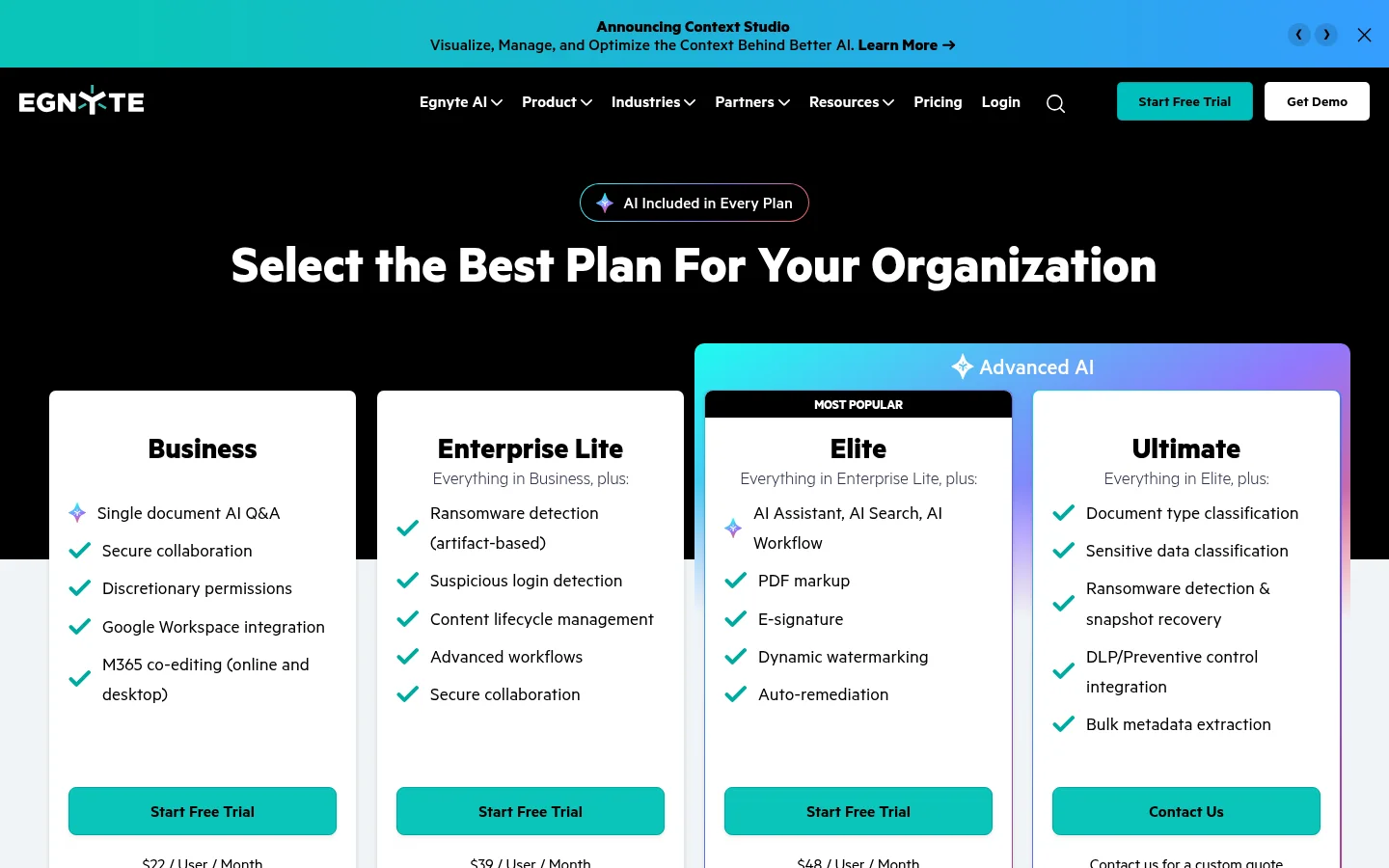
Egnyte's pricing page lists its plans:
Business, $22 per user per month. It adds Microsoft 365 co-editing, online and desktop.
Enterprise Lite, $39 per user per month. It adds ransomware detection and content lifecycle management.
Elite, $48 per user per month. It adds PDF markup.
The top plan, a custom quote. It adds sensitive data classification.
Egnyte's feature list also includes email-validated sharing, which limits file sharing to specific email addresses.
What Tarkle does
Tarkle is a cloud storage and file-sharing platform for freelancers, agencies and client-facing businesses. Tarkle is built for the client hand-off.
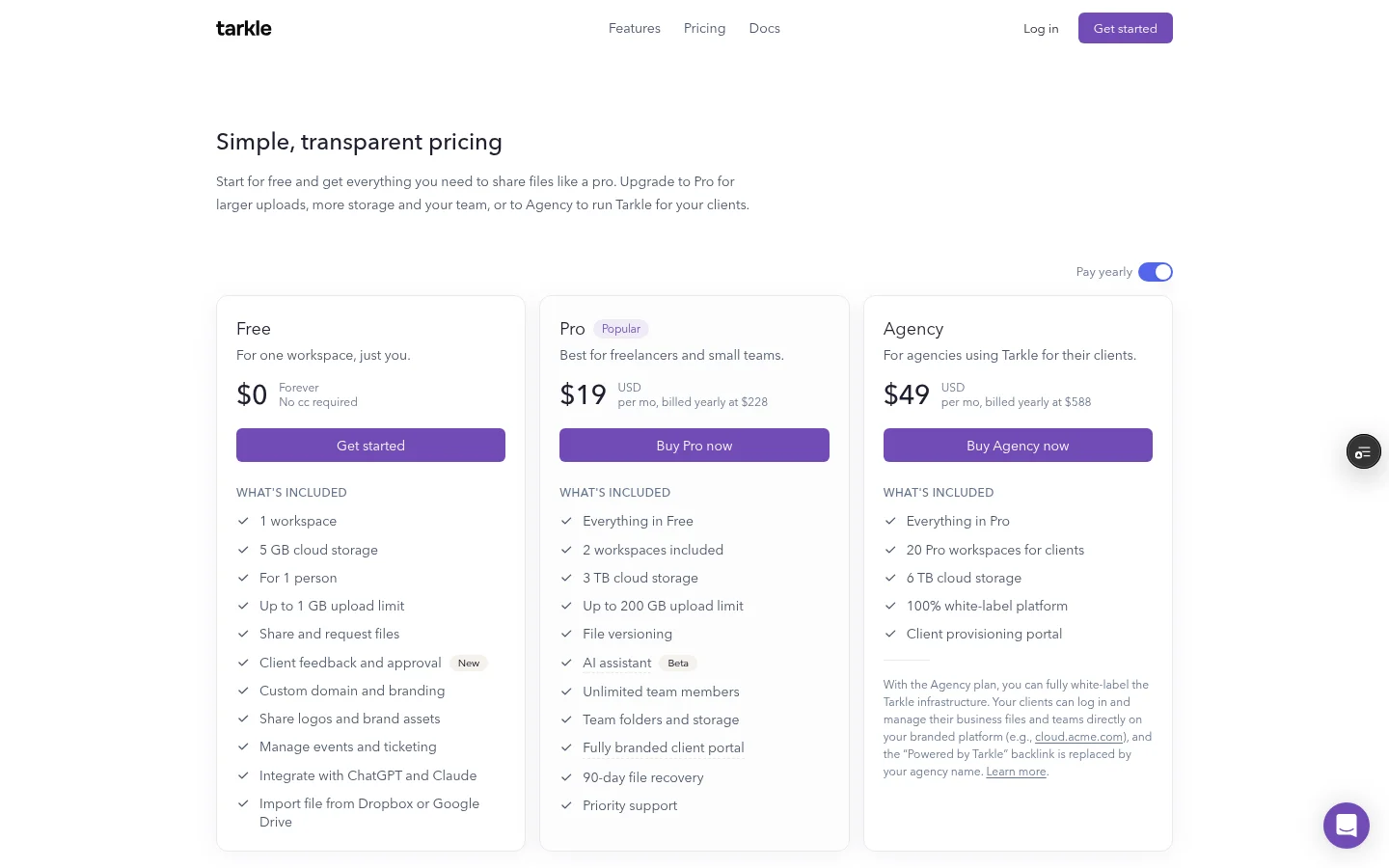
Plans, from the pricing page:
Free, $0 for one person. It includes file sharing, file requests, client feedback and approval, and custom branding. The Powered by Tarkle line stays on your pages.
Pro, $29 per month, or $19 per month billed yearly ($228/year). Two workspaces and 3 TB of storage. It includes a fully branded client portal. Pro and Agency include team members in the plan price.
Agency, $59 per month, or $49 per month billed yearly ($588/year). Everything in Pro, plus 20 workspaces for your clients. The Powered by Tarkle backlink becomes Powered by your agency.
For sharing and tracking, you can share files by link and protect a link with a password, a link expiration date or a one-time download link. Recipients can open or download shared files without creating a Tarkle account. Transfer status shows whether a transfer was delivered, viewed or downloaded.
On Pro and Agency, the client portal gives each client a branded place where they sign in with their email, see only what you shared with them and send files back. You add the client as a contact and turn on portal access for them. Then they enter their email and use the sign-in code emailed to them.
File requests collect files from anyone with one link, into the folder you choose. You can set a deadline on a request and the most a visitor can upload at once. Client feedback turns images and PDFs into a review board that clients comment on and approve with one link. Paid transfers charge for access through your own Stripe account, on Pro and Agency.
A custom domain is included on Free. On Agency, white label replaces Tarkle with your own name, logo, colours and domain, so clients see your platform. You can also choose where your files are stored: Europe, the US, Asia-Pacific or Oceania.
Egnyte vs Tarkle
Feature | Egnyte | Tarkle |
|---|---|---|
Governance and retention | Content lifecycle policies, ransomware detection, sensitive data classification on the top plan | Tarkle is built for the client hand-off |
Review and co-editing | Microsoft 365 co-editing, online and desktop | Client feedback and approval on images and PDFs |
Sharing with outsiders | Email-validated sharing and external user accounts | A password, an expiration date or a one-time download link |
Client portal | Document Portal, an industry option for financial services | Branded client portal on Pro and Agency |
Who should choose Egnyte
Choose Egnyte if your company needs to control its own content as much as it needs to share it. That means content lifecycle management, ransomware detection, or a desktop app with co-editing in Microsoft 365. Tarkle is built for the client hand-off, not for these jobs, so a firm with those duties should keep Egnyte for them.
Who should choose Tarkle
Choose Tarkle when the job is the hand-off to a client. A client opens a link on your own domain and downloads without an account. You can see whether it was viewed or downloaded, and set the link to expire.
For ongoing clients, the Pro client portal gives each client a place that shows only their files. Agency gives you a branded workspace for each client, on your own domain. The client portal starts on Pro.
Start with the Free plan, send one real transfer to a client, and see how it feels. Start for free.
Switching from Egnyte to Tarkle
You do not have to move everything. Governed internal content can stay in Egnyte, and the files that go to clients can move to Tarkle. If you do move client-facing folders:
Download the folders you share with clients from Egnyte, then upload them to Tarkle.
Add your logo and colours, and set up your custom domain.
On Pro or Agency, invite your team.
Replace the old Egnyte links in your emails and proposals with the new links, and stop sharing the old ones.
Move one active client first. Send them a transfer on your own domain, and keep the old Egnyte link live for a week so nothing breaks while they switch.
Frequently asked questions
Is Tarkle an Egnyte alternative?
For sending files to clients, yes. For content governance and retention, no, because Tarkle is built for the client hand-off.
How much does Egnyte cost?
Business is $22 per user per month, Enterprise Lite is $39 and Elite is $48, all paid annually. The top plan is a custom quote.
Can I use my own domain for Tarkle links?
Yes. A custom domain is included on Free.
Does Tarkle charge per user?
Free is for 1 person. Pro and Agency include team members in the plan price.
What is the largest file I can send with Tarkle?
Free allows uploads up to 1 GB. Pro and Agency allow files up to 200 GB.



