
Tarkle vs Drime Cloud: sending files to clients or a wider workspace
Drime Cloud suits storage, backup and e-signature; Tarkle suits branded sending to clients. Plans and limits compared.
Drime Cloud is the better pick if you want one European workspace for storage, backup, an office suite, e-signature and an encrypted Vault. Tarkle is the better pick if your main job is sending files to clients and collecting files back, under your own brand and domain.
We make Tarkle, so read this as one vendor's view, and check the sources. Drime facts below come from Drime's own pages, and each carries its link.
What Drime Cloud is
Drime is a cloud workspace hosted in Europe, according to its pricing page. Its plans cover storage plus the tools around it: an office suite, image editing, Drime Sign for e-signature, and an encrypted Vault. Its Free plan gives 20 GB to store, share and collaborate on your files. Computer backup and phone photo backup are listed on every plan.
What Drime Cloud offers for sharing files
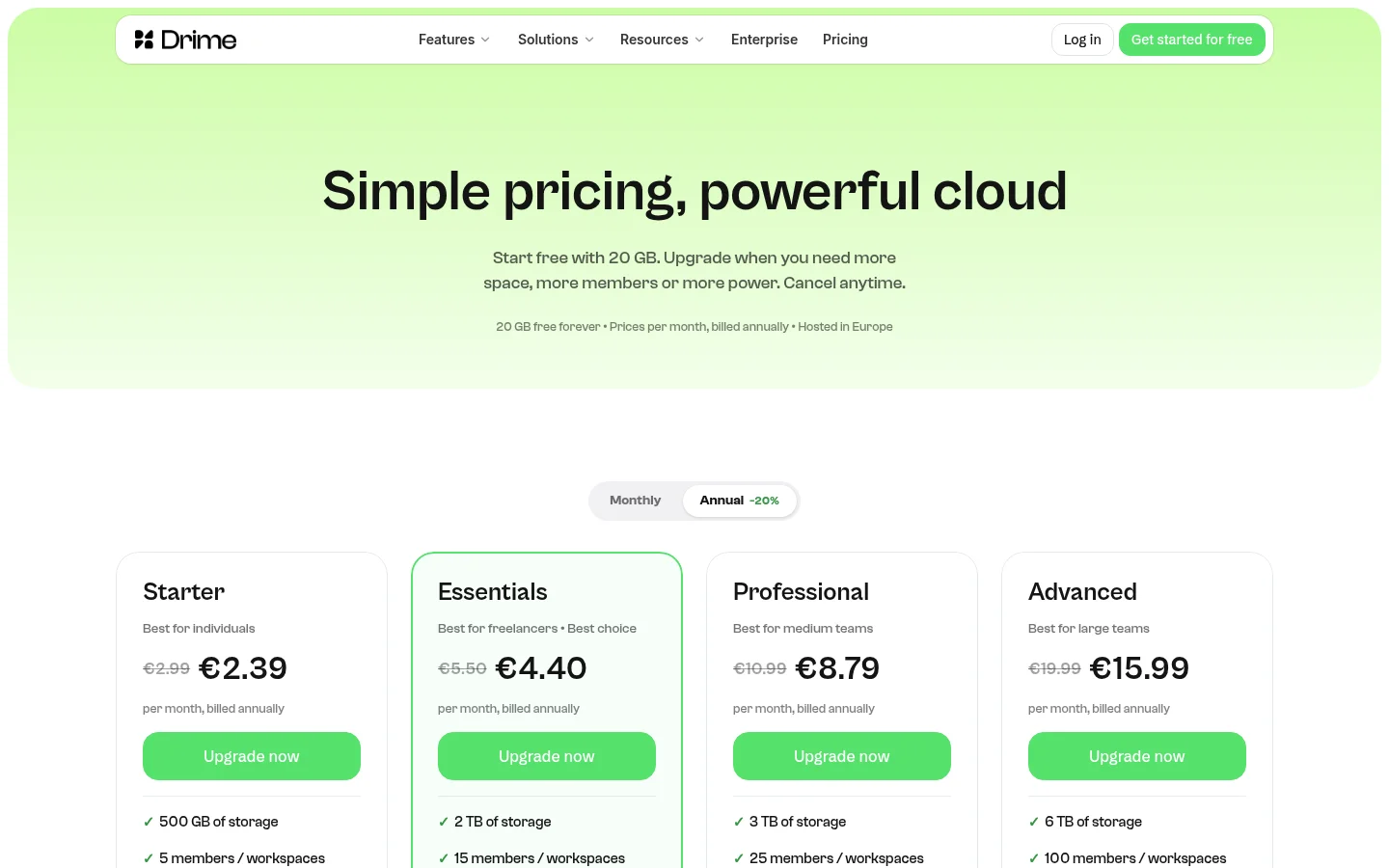
Drime's pricing page lists its plans. Its prices are in euros per month, and the lower figure applies when billed annually.
Plan | Per month (billed annually) | Storage |
|---|---|---|
Free | €0 | 20 GB |
Starter | €2.99 (€2.39) | 500 GB |
Essentials | €5.50 (€4.40) | 2 TB |
Professional | €10.99 (€8.79) | 3 TB |
Advanced | €19.99 (€15.99) | 6 TB |
For client work, the plan matters more than the storage figure. File requests and large file delivery are on every Drime plan, and the comparison lists unlimited maximum file size on every plan.
Links with expiry dates and password-protected links start on Essentials. Workspace branding starts on Professional.
Drime's plan overview does not list a client portal.
What Tarkle does
Tarkle is a cloud storage and file-sharing platform for freelancers, agencies, and client-facing businesses. Pick files or folders, get one link and send it. On a public link, recipients can open or download shared files without creating a Tarkle account.
On a transfer you can set a password, an expiry date, an email check before download, a one-time link or view-only access. The file sharing page covers each control.
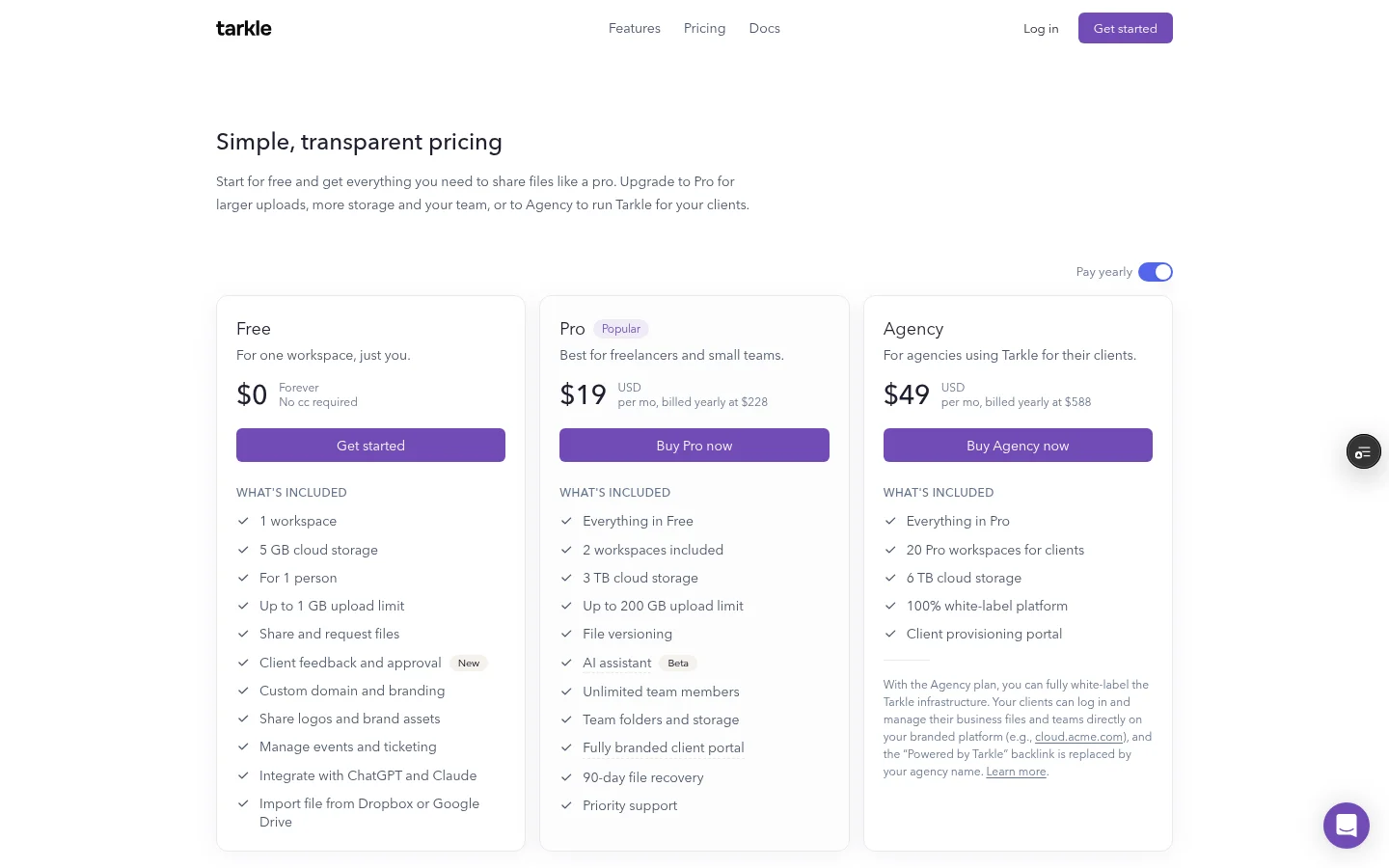
Tarkle's pricing page lists the plans. Tarkle's Free plan is $0 forever, with no credit card required. It includes 1 workspace, 5 GB of storage and an upload limit of 1 GB. Pro is $29 a month, or $19 a month billed yearly, with 3 TB, 2 workspaces, files up to 200 GB and unlimited team members. Agency is $59 a month, or $49 a month billed yearly, with 6 TB and 20 client workspaces. Pro and Agency are paid by card at checkout.
Custom domains are available on every plan, so links can sit on your own domain. Custom transfer links name each link.
Free keeps the Powered by Tarkle mark on your pages, including on your own domain. Pro can remove it with the branding setting, and on Agency the white-label setting replaces it with your agency name.
Transfer status shows whether a transfer was delivered, viewed or downloaded. The activity log keeps a searchable record with export. File requests collect files from anyone with one link, into the folder you choose.
On Pro and Agency, the client portal is a branded place where each client signs in with their email, sees what you shared and sends files back. Clients use passwordless sign-in, with a link sent to their email and no password to remember.
Agency adds 20 client workspaces, 6 TB of storage and a 100% white-label platform. Your clients log in and manage their files and team on your own domain.
You can also choose where your files are stored: Europe, the United States, Asia-Pacific or Oceania.
Drime Cloud vs Tarkle
Prices are in each vendor's own currency, so the amounts below are not a like-for-like total.
Tarkle | Drime Cloud | |
|---|---|---|
Free plan | 5 GB and 1 workspace | 20 GB, 2 collaborators |
File requests | Yes, including Free | Yes, every plan |
Data location | Europe, the United States, Asia-Pacific or Oceania | Hosted in Europe |
Who should choose Drime Cloud
Choose Drime if you want storage, an office suite, Drime Sign e-signature and an encrypted Vault in one account. Computer backup and phone photo backup are listed on every plan, so it also fits if you need them.
If your files need to stay in Europe, Drime's pricing page says it is hosted in Europe. Tarkle lets you choose Europe as the storage region. Check that point against your contract.
Drime's Free plan is bigger too: it gives 20 GB to store, share and collaborate on your files, against Tarkle's 5 GB. If you want a larger free place to keep files, start there.
Who should choose Tarkle
Choose Tarkle when the files end up with clients and the client should see your brand. The list below is what Tarkle does for that job.
Send under your own name. Custom domains are available on every plan, and custom transfer links name each link.
Control who opens what. You can set a password, an expiry date, an email check before download, a one-time link or view-only access on each transfer.
Know what happened. Transfer status shows whether a transfer was delivered, viewed or downloaded, and the activity log is searchable.
Get files back. File requests collect files from anyone with one link, into the folder you choose.
Give each client a home. Pro and Agency include a fully branded client portal. Clients sign in with a link sent to their email. No password to remember. On Agency, 20 client workspaces.
Charge before a download. Paid transfers take payment through your own Stripe account. They need Pro or Agency, a connected Stripe account and the paid transfers switch turned on in Settings. A paid transfer cannot also use a password, an expiry date, an email check, a one-time link or view-only access.
Tarkle is designed primarily for agencies, consulting firms, and other client-facing businesses.
Start on the Free plan. Tarkle is free to use forever. You can send one real transfer to yourself in a private window to see what a client would see. The client portal is on Pro and Agency, and paid transfers need Pro or Agency.
Switching from Drime Cloud to Tarkle
Download the client folders you still need from Drime.
Sign in or create a Tarkle account with an emailed code or Google, then pick the files or folders you need.
Set your custom domain, then create one transfer.
Open it in a private window and check what a client sees.
You do not have to move everything at once. Start with the client folders you send most often.
FAQ
Is Drime Cloud free? Drime has a Free plan that gives 20 GB to store, share and collaborate on your files.
Does Drime Cloud have a client portal? Drime's plan overview does not list a client portal.
Does Drime Cloud have e-signature and backup? Yes. Computer backup and phone photo backup are listed on every plan, and Drime Sign is on its plans.
Can clients download from Tarkle without an account? On a public link, yes. Recipients can open or download shared files without creating a Tarkle account.
Next step
Start for free and send one real client transfer from your own domain. For other tools in this space, see the free Dropbox alternatives.



